_Sometimes_ the hardest part of getting your great e-commerce website into the world is picking a font. Just me? Even if you don’t find this part hard, it is definitely time consuming. So, we are very happy to introduce to you a very well-designed e-commerce theme, with fantastic fonts if I may say, from the masterminds at [Matter Design](https://matterdesign.com.au/). We teamed up with the award-winning e-commerce agency to bring a beautiful site theme that lets you hook up all your favorite tooling to bring your store to life faster!

- Play with the [live demo](https://gatsby-ecommerce-theme.netlify.app/)
- Start digging into the code in [the theme repo](https://github.com/netlify-templates/gatsby-ecommerce-theme)
- Use this button to clone the repo, create a new Netlify project, and get it deployed ASAP:
[](https://app.netlify.com/start/deploy?repository=https://github.com/netlify-templates/gatsby-ecommerce-theme&utm_source=github&utm_medium=matter-design-theme-repo&utm_campaign=template-team)
Let’s dig into how to make some edits, how to deploy it, and some suggestions for tools that can help you add important functionality to this theme.
## Make this E-Commerce Theme Matter to You
There are a few different ways to make the code base yours.
- From the [theme’s repo](https://github.com/netlify-templates/gatsby-ecommerce-theme) you can clone the repo using the ‘Use this template’ button at the top right or run the `git clone` command from your terminal.
```
git clone https://github.com/netlify-templates/gatsby-ecommerce-theme
```
- You can install the [Netlify CLI](https://ntl.fyi/3PMlE9a), then run a command that will clone the repo and create a new Netlify project.
```
npm install netlify-cli -g
netlify sites:create-template https://github.com/netlify-templates/gatsby-ecommerce-theme
```
- From your [Netlify dashboard](https://app.netlify.com/) you can also create a new project from a template by clicking the ‘Add new site’ dropdown and selecting ‘Start from a template’.

Find the ‘Gatsby E-Commerce Theme’, and click the ‘Use template’ button overlay on the image.
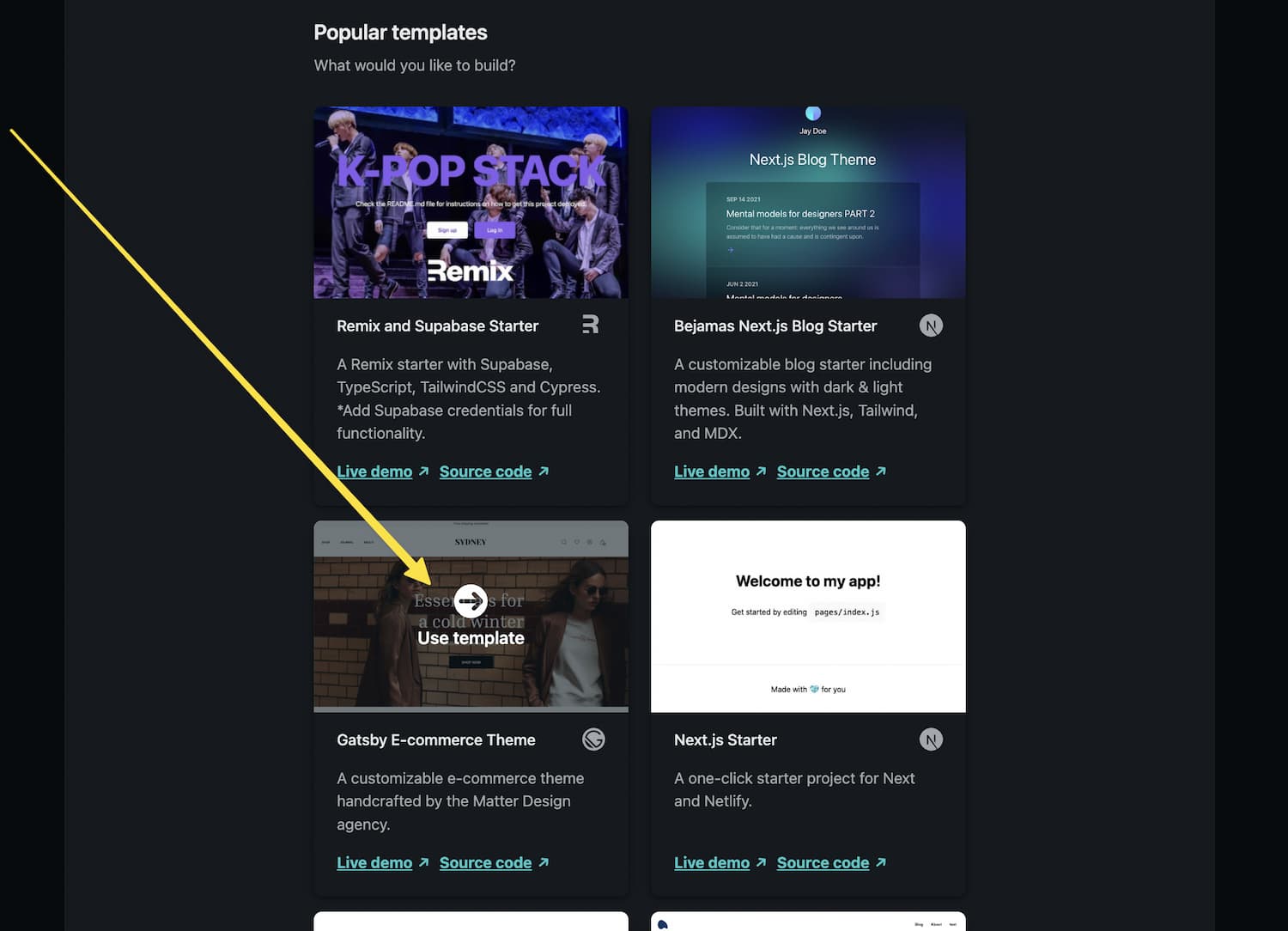
Click the button for your preferred Git provider.

Feel free to change the repository name, then click the ‘Deploy site’ button to get the repo cloned to your account and deploy the site.
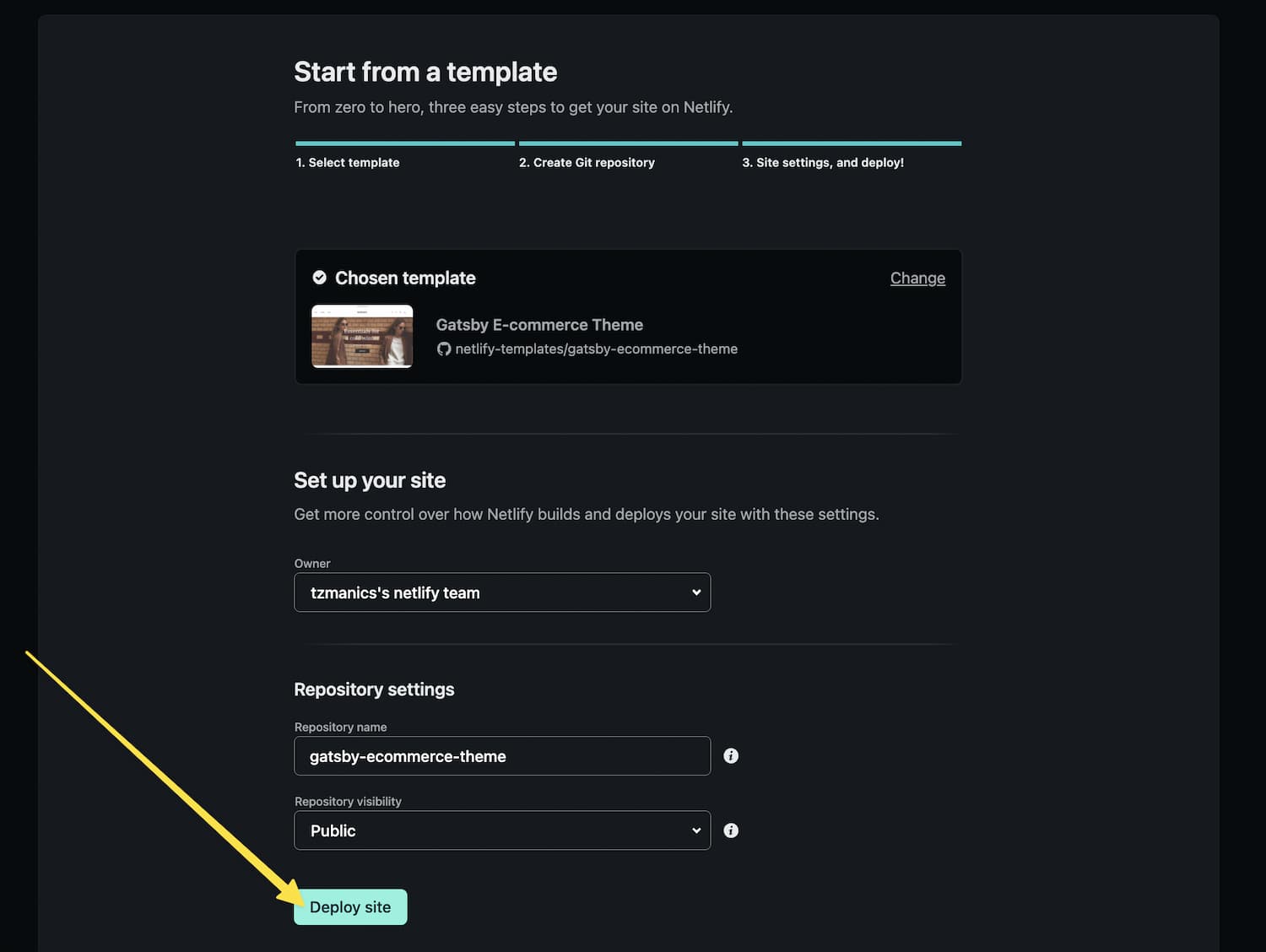
This will send you to your new Netlify project page!
### Making Customizations
Now that you have the project, you can start to edit the code to customize the website. For instance, to change the image or title on the home page you would edit the `src/pages/index.js` file’s `` component.
```
```
You can learn more about the project structure and content changes [here in the repo](https://github.com/netlify-templates/gatsby-ecommerce-theme#project-structure)
### Adding More Functionality
With your e-commerce website theme customized, you can now add your preferred tools for grabbing your product information, cart state management, payment, and more. Matter Design has a section in the theme called the [How to use section](https://gatsby-ecommerce-theme.netlify.app/how-to-use/) that discusses their [JAMM headless e-commerce framework tool](https://matterdesign.com.au/jamm-build-with-headless-architecture/) that would work well for this theme.
There are also a variety of other tools that you can use like [BigCommerce](https://www.bigcommerce.com/), [Square](https://squareup.com/), [Stripe](https://stripe.com/), [Shopify](https://www.shopify.com/), [Snipcart](https://snipcart.com/), and so many more, plus [this whole list of Headless CMS libraries](https://jamstack.org/headless-cms/) from the [Jamstack website](https://jamstack.org/).
## Make your E-Commerce Site Matter to the Rest of the World
There are multiple ways to deploy your website for the world to see.
- Using the [Netlify CLI](https://docs.netlify.com/cli/get-started/) you can run `netlify init` if the project isn’t already hooked up to a Netlify project, then run `netlify deploy --prod` (if you don’t use `--prod` you will get a deploy preview link).
- From your Netlify projects dashboard you can select the ‘Deploy’ tab, and click the ‘Trigger deploy’ button.
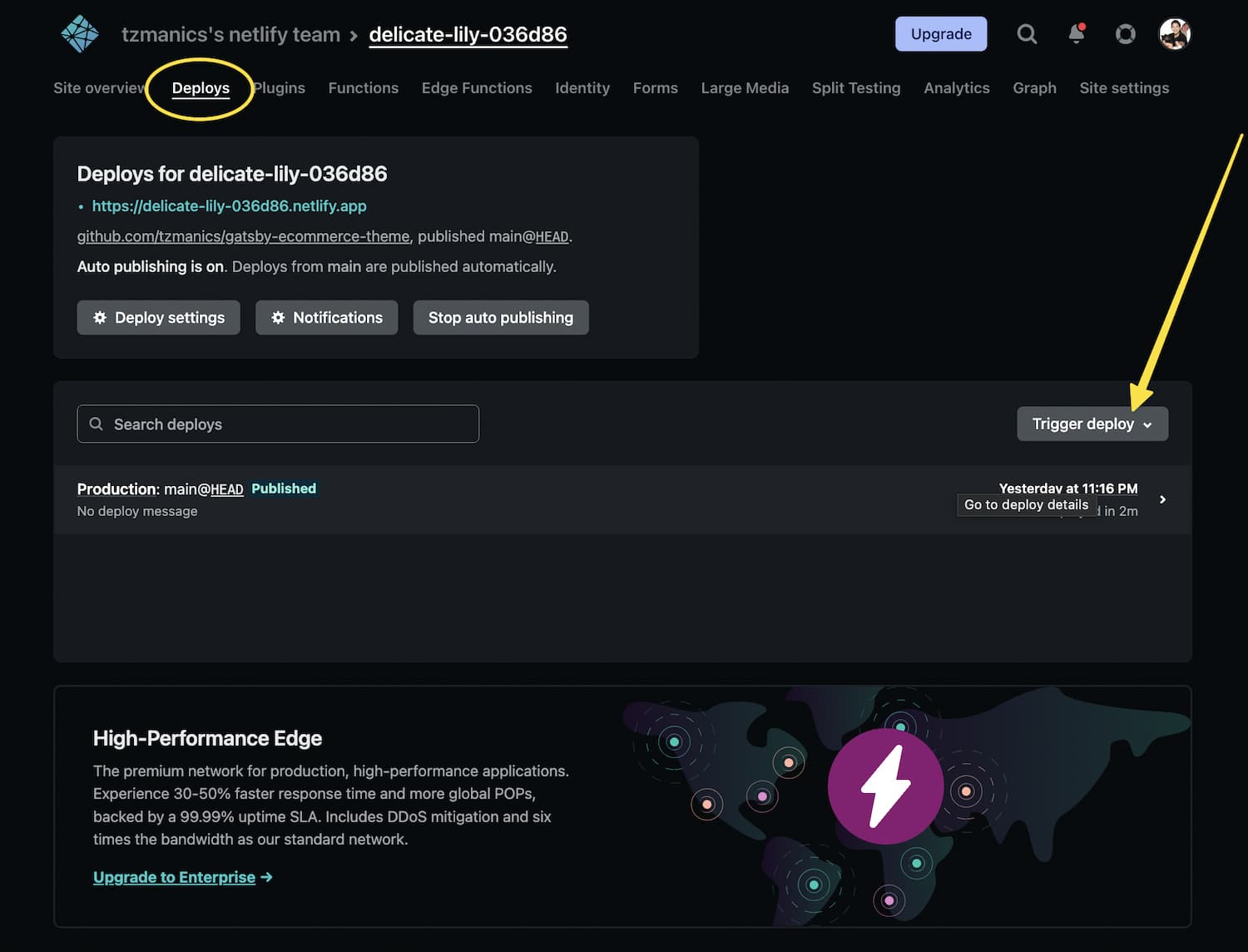
With that your website will be live for the world to give you lots of money, I mean, if that’s what you’re into 🤑.
## Do Something Else that Matters
You’ve saved so much time, and now you have the ball rolling. Go reward your efforts and do something fun, relaxing, inspiring, heart-filling, something that matters to you. We can’t wait to see what you’ve created. Happy coding 👩🏻💻!
### Share
- [X (fka Twitter)](https://twitter.com/intent/tweet?text=A Beautiful E-commerce Website Theme For Gatsby&url=https://www.netlify.com/blog/a-beautiful-e-commerce-theme-for-gatsby/)
- [LinkedIn](https://www.linkedin.com/shareArticle?mini=true&url=https%3A%2F%2Fwww.netlify.com%2Fblog%2Fa-beautiful-e-commerce-theme-for-gatsby%2F)
- [Facebook](https://www.facebook.com/sharer.php?u=https://www.netlify.com/blog/a-beautiful-e-commerce-theme-for-gatsby/)
- [Bluesky](https://bsky.app/intent/compose?text=A Beautiful E-commerce Website Theme For Gatsby+https://www.netlify.com/blog/a-beautiful-e-commerce-theme-for-gatsby/)
* * *
### Tags
- [Gatsby](/blog/tags/gatsby/)
- [templates](/blog/tags/templates/)
## Keep reading

Guides & Tutorials May 15, 2026
[
### How to build a real-time AI chatbot in minutes with Netlify Agent Runners (no backend)
](/blog/how-to-build-a-real-time-ai-chatbot-in-minutes-with-netlify-agent-runners-no-backend)
- 
Nahrin Jalal

Guides & Tutorials May 15, 2026
[
### Tracking AI search traffic: how to use Netlify Log Drains to maximize AEO
](/blog/tracking-ai-search-traffic)
- 
Nahrin Jalal
## Recent posts
News & Announcements June 25, 2026
[
### Netlify Functions, designed for Agent Experience
](/blog/netlify-functions-designed-for-agent-experience)
- 
Eduardo Bouças
News & Announcements June 24, 2026
[
### How we measure Netlify’s Agent Experience
](/blog/how-we-measure-netlify-agent-experience)
- 
Sean Roberts
Guides & Tutorials May 15, 2026
[
### How to build a real-time AI chatbot in minutes with Netlify Agent Runners (no backend)
](/blog/how-to-build-a-real-time-ai-chatbot-in-minutes-with-netlify-agent-runners-no-backend)
- 
Nahrin Jalal
### How do the best dev and marketing teams work together?
[Access the report](https://www.netlify.com/reports/2024-leadership-trend-report/access/)