Netlify has rebuilt its entire build infrastructure from the ground up. We’ve replaced our Kubernetes-based system with Firecracker MicroVMs, the same hardware-acceleration technology that powers AWS Lambda.
This upgrade is going live to all customers, processing approximately 450,000 builds per day and nearly 3 million builds every week across the Netlify network. The best part? Zero configuration changes are required. You get the performance boost automatically on your existing projects. The performance gains for a large enterprise customer has already been significant, achieving 33% improvement in their end-to-end build times using this new architecture.
Speed you can see
By moving to a pull-based architecture with pre-warmed VMs, we’ve eliminated the bottlenecks of traditional scheduling. The results are consistent across projects of all sizes:
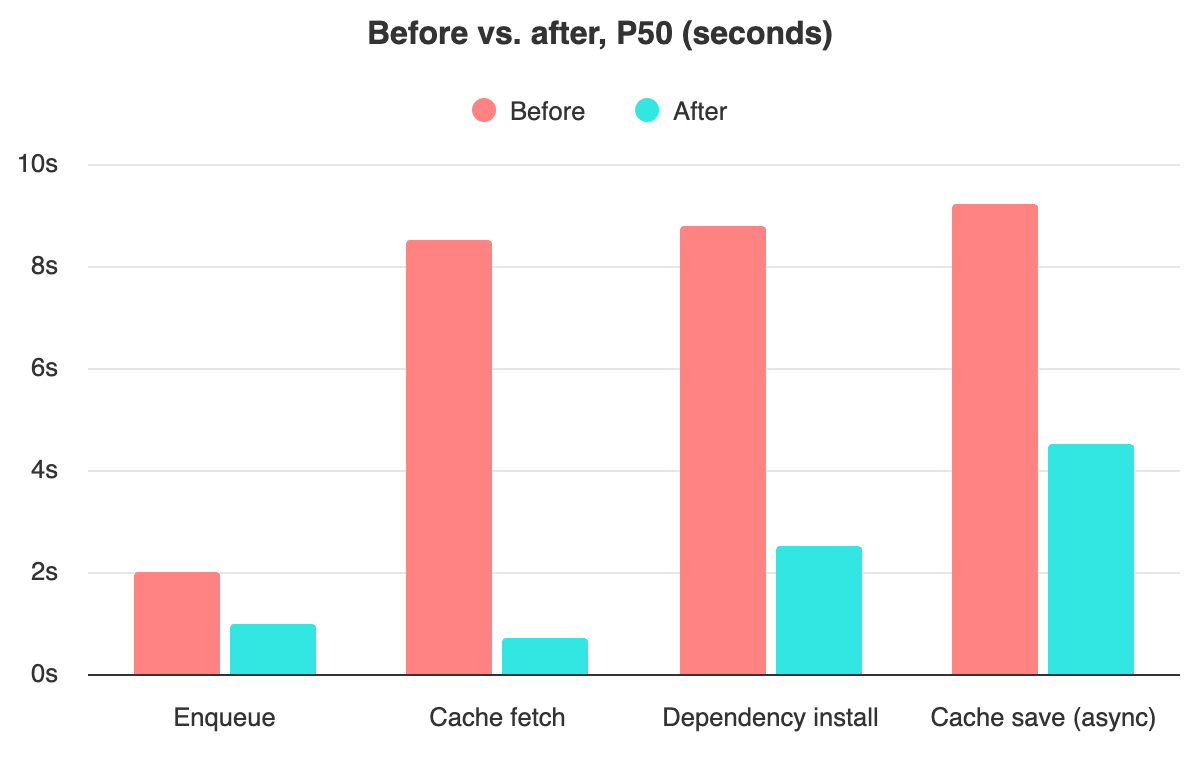
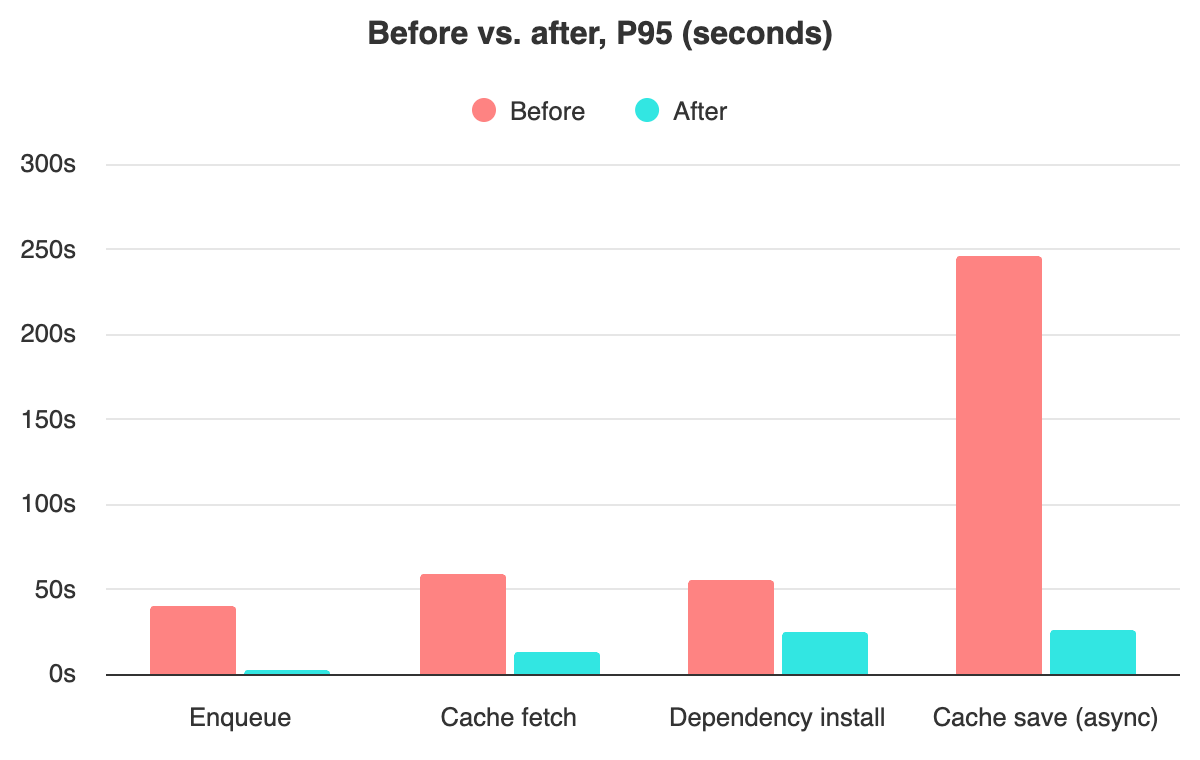
- 95% faster queues: The time a build spends waiting to start (P95) dropped from about 40 seconds to under 2 seconds (P50 dropping from about 2 seconds to 1 second).
- 77% faster cache fetch: Moving cached dependencies to high-speed shared storage reduced P95 fetch times from 59.4 seconds to 13.4 seconds (P50 dropped from 8.5 seconds to less than a second).
- 56% faster dependency install: Our new layered filesystem cut P95 installation times from 55.8 seconds to 24.2 seconds (P50 dropped from 8.8 seconds to 2.5 seconds).
- Rapid cache saving: The time required to save build assets (P95) dropped from over 4 minutes to just 26 seconds (P50 dropped from 9.2 seconds to 4.5 seconds).
We run millions of builds. Every millisecond we shave off startup time, every cache hit we enable, adds up. Here’s how we built a system optimized for fast builds at scale.
Validated for the modern web
We have rigorously tested this new infrastructure to ensure 100% compatibility with the frameworks you use every day. The system is fully validated for Next.js, Tanstack Start, Astro, Gatsby, Hugo, Nuxt, Remix, SvelteKit and other popular frameworks. Your existing netlify.toml configuration file, build commands and environment variables will work exactly as they do today with no changes required.
The underlying technology
What’s a MicroVM?
Firecracker is the virtualization technology built to power AWS Lambda. Unlike traditional VMs that might take 30 seconds to boot and consume gigabytes of memory, a Firecracker VM boots in under a second with minimum memory overhead and hardware-level isolation.
Compared to the container-based approach that we’ve used before, Firecracker is not only faster but also inherently more isolated, as each build only has access to its own kernel. This means a much smaller surface area for attackers.
The architecture
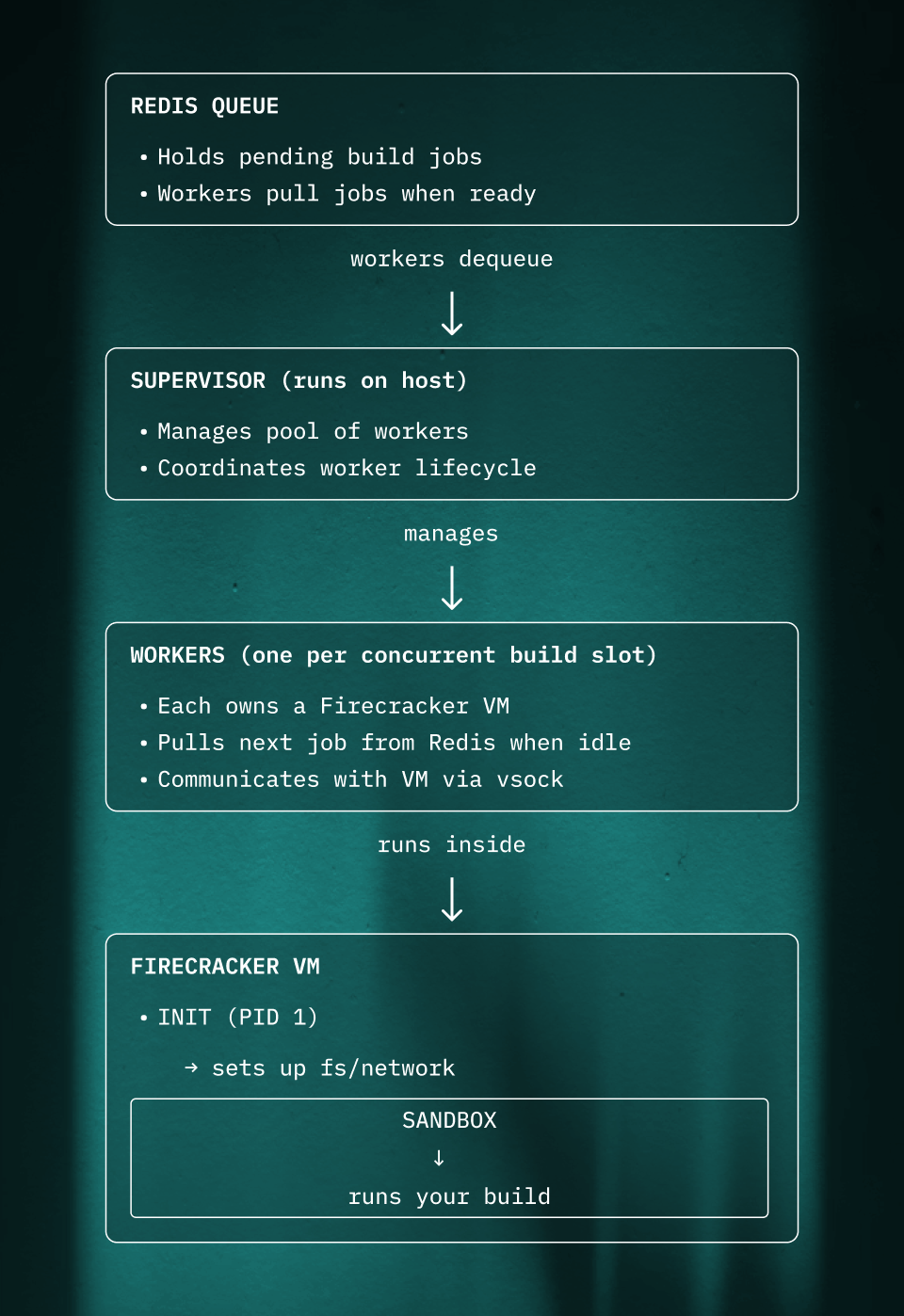
The system has these main components:
Pull-based work distribution
Rather than a central scheduler pushing jobs to workers, each worker pulls its own work from Redis. This removes any bottleneck or heavy coordination needs. Workers grab jobs as fast as they can handle them.
Pre-warming: VMs ready before work arrives
Starting a VM takes time - even a fast Firecracker VM needs a moment to boot and initialize. If we waited until a job arrived to start the VM, every build would pay that cost.
Instead, workers pre-warm their VMs. While idle, a worker:
- Boots its Firecracker VM
- Runs the init process
- Gets the sandbox ready and waiting for commands
When a job comes off the Redis queue, the VM is already running. The worker just needs to configure the filesystem for the specific build and send the “start” command. This shaves hundreds of milliseconds off every build.
Autoscaling
We manage the size of our fleet of hosts via a custom autoscaler. We monitor both the flow of jobs in the redis queue and our utilization rates to maintain a buffer of available workers. This allows us to handle traffic spikes.
Inside the VM
The VM runs a minimal Linux system. When it boots:
- Init (PID 1) sets up the basics: mounts essential directories, configures networking
- Init starts the sandbox process
- Sandbox connects to the host via vsock and waits for commands
Communication happens over vsock, a socket built for fast, low-overhead VM-to-host communication.
The protocol is simple: JSON messages over a persistent connection. The host sends a “start task” message with the command and environment variables, and the VM streams back stdout/stderr in real-time.
The filesystem: layers, network storage, and S3
Every build needs:
- A base operating system (Ubuntu, Node.js, build tools, etc.)
- Any cached dependencies from previous builds
- A place to write new files
Copying the base image and cached dependencies for every build would be slow and wasteful. Instead, the system uses an overlay filesystem - a Linux feature that stacks a writable layer on top of read-only layers. The base image is shared across all builds, and only changed files are stored per-build.
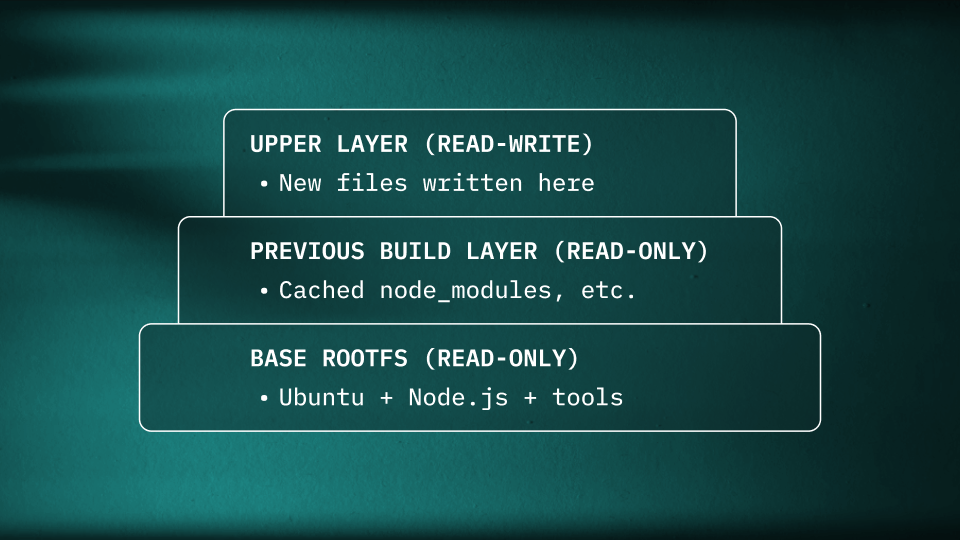
When a process reads a file, the overlay checks each layer from top to bottom. When a process writes, it goes to the upper layer. The lower layers are never modified.
Where the layers live
The layers are stored on a combination of network storage and S3:
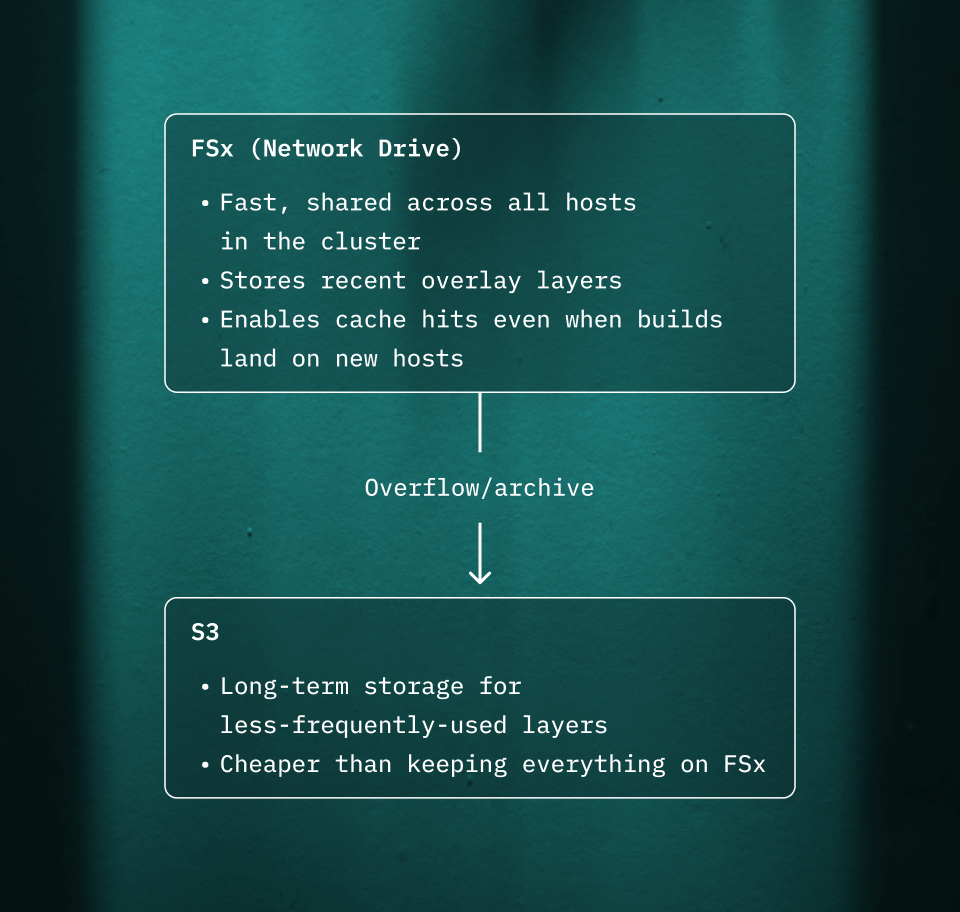
This two-tier approach balances speed and cost:
- FSx is fast but expensive per GB
- S3 is cheap but has higher latency
Hot layers (recently used) stay on FSx. Cold layers are archived to S3.
How caching works across builds
After a build completes:
- The upper layer (everything the build wrote) gets saved to FSx
- Metadata is tracked so we can find it later
- On the next build for the same site (and branch), that layer becomes a read-only lower layer
- New writes go to a fresh upper layer
This means npm install on a project that hasn’t changed its package.json is nearly instant - all those node_modules are already there in the cached layer.
Because the cache lives on shared network storage, it works even if the next build lands on a different host. The layer is fetched from FSx (or S3 if it’s been archived), mounted as a lower layer, and the build continues where it left off.
This architecture - ephemeral VMs, pull-based work distribution, layered filesystems on shared storage - solves a hard problem: running arbitrary code from untrusted sources, quickly and at large scale.
Live today
This new infrastructure is more than a speed boost; it’s a more secure, scalable foundation for the future of web development. It’s already handling your production traffic today at the same pricing and with zero work required on your end.
For customers: Check your recent build performance.
New to Netlify? Deploy your first build on our next-gen infrastructure.