Use Netlify Agent Runners from Linear
February 27, 2026
Linear users can now launch Netlify Agent Runners directly from any Linear issue, allowing you to seamlessly share context with your AI agent of choice. If you have your Linear issue synced with related Slack messages, this context will also be included in your agent run prompt.
Before starting your agent run, you can review and edit your prompt. Next, you can choose which AI agent to use — Claude Code, Google Gemini, or OpenAI Codex. Netlify Agent Runners doesn’t lock you into using a single AI agent so you can pick the agent that fits the task best.
To start an agent run from Linear:
- Go to a Linear issue where you want to trigger an agent run.
- In the top right corner, select Configure coding tools….
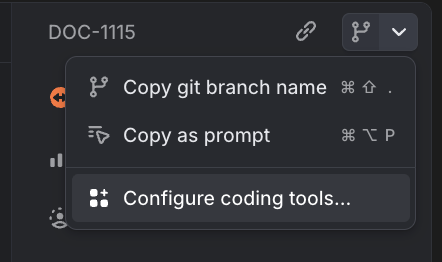
- Toggle Netlify Agent Runners on.
- Go back to the issue and in the top right corner, select Open in Netlify Agent Runners.
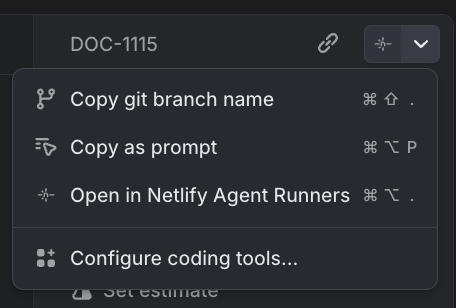
- Review the prompt and choose your AI agent.
- To start the agent run, select Run task.
Once you’ve enabled this integration from your personal Linear preference settings, any Linear issue you open in your workspace will give you the option to open with Netlify Agent Runners.
Now your entire team can save time and seamlessly share context between Linear and Netlify Agent Runners while keeping this work clearly tracked across Linear and Netlify. Learn more about Agent Runners.