The new Netlify experience
We’ve redesigned Netlify and refreshed our brand to match.
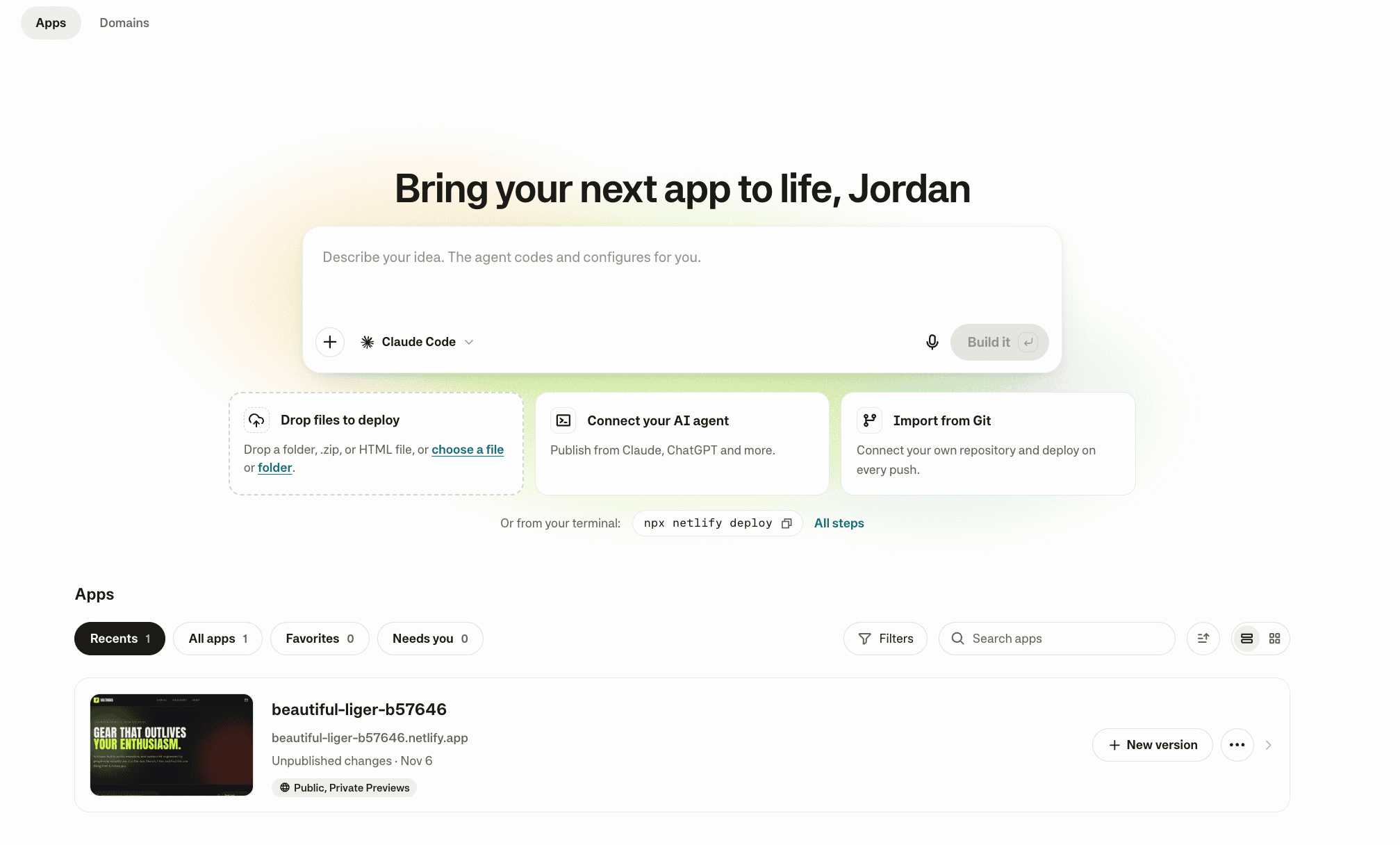
Today, we’re rolling out the new Netlify experience, designed for working with both your agents and your team. The redesigned dashboard keeps you building, iterating and shipping without leaving your flow. Everyone on your team works on the same app, whether they prompt an agent, push to Git, or deploy from the CLI.
Read more about the thinking behind this launch and what’s next for Netlify in Why all of you can build with us in Netlify’s next decade, and get a closer look in Inside the new Netlify.
One platform for every builder
Netlify is the AI app platform designed for everyone, whether you’re an experienced developer, a new kind of builder, or a global business. Start with a prompt, your own code and agents, or something you started elsewhere.
Already building on Netlify? The new experience supports the projects and workflows you use today, including Git, the Netlify CLI, and Netlify Drop. Databases, logins, forms, functions and more are built in, and every change gets a preview your team can review before it goes live.
What’s new in the Netlify experience
The new experience is simpler to navigate and uses plain language, without giving up the technical depth of what you and your agents can do. Here are some highlights:
- Create an app your way. Write or dictate a prompt and choose an agent and model to build your app. You and your team can still publish on Netlify in many different ways: drag and drop your files or folder to deploy, import from Git, connect the AI agent you already use, or run
netlify deployfrom your terminal. - Build together on one app. Every way of working lands in the same app, so a developer pushing to Git and a teammate prompting an agent are building the same thing. Everyone can work the way that suits them, and no one’s workflow is an afterthought.
- Version management for everyone. Every change creates a version with a preview that you can review, archive or publish. Switch between in-progress and published versions from the versions menu. We’ve reframed versioning so you can understand how it works even without connecting your project to a Git repository.
- Simplified settings. Search your app settings to find what you need, with plain-language descriptions of how each one works. You get the same power of Netlify with less setup complexity.
- Privacy and domains in a few clicks. Under Manage > Your app > Who can see it, add a password or require a Netlify team login. You can also buy or bring a domain, and we’ll secure it with HTTPS for you.
Build with the services you already use
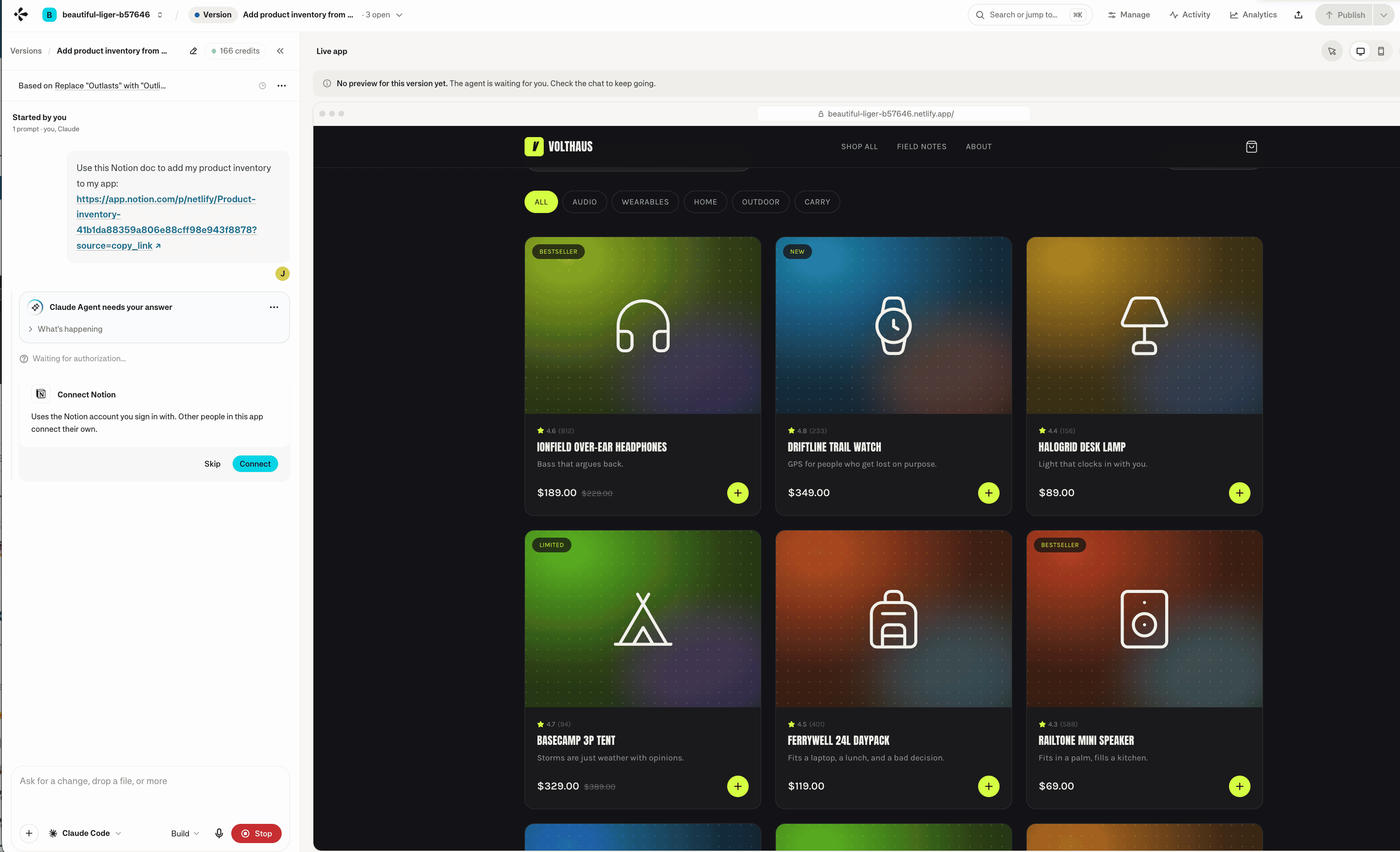
Connectors also work with the new Netlify experience. As a recap, connectors let your agent work with services you already use, such as Linear, Notion, Stripe and Snowflake, so it can build from your existing specs and data or set up features like payments.
For example, ask your agent to use a Notion doc link to add your product inventory to your app. Your agent prompts you to connect your Notion account, then pulls in that data as it builds. Each person working on the app connects their own account.
Learn more in Build with connectors.
Who can use it
The new experience is rolling out gradually, starting with most new users on November 18, 2026. Want access? Sign in and join the waitlist. We’re prioritizing waitlisted users as access expands and will let you know when you have access.
Connectors launched on November 17 and are available on all credit-based plans, including Enterprise plans that use credits.
Learn more
- Read the thinking behind the new experience on the Netlify blog.
- Want to share your app, learn from other builders, or give feedback? Join the Netlify Builders community.