
About a billion Edge Functions run on Netlify every day — Sunweb personalizing pages, Loto-Québec routing traffic on a cookie check, and hundreds of thousands of other sites doing everything from personalization to routing to auth. All of it runs on a full JavaScript runtime that scales with our customers’ traffic.
This poses a significant technical challenge, as we strive to make the latency as low as possible. To run tens, sometimes hundreds of thousands, of edge functions per second, we need to process each request, route it correctly, allocate compute capacity, and boot both our platform code and the customer’s code. All of that has to happen within milliseconds.
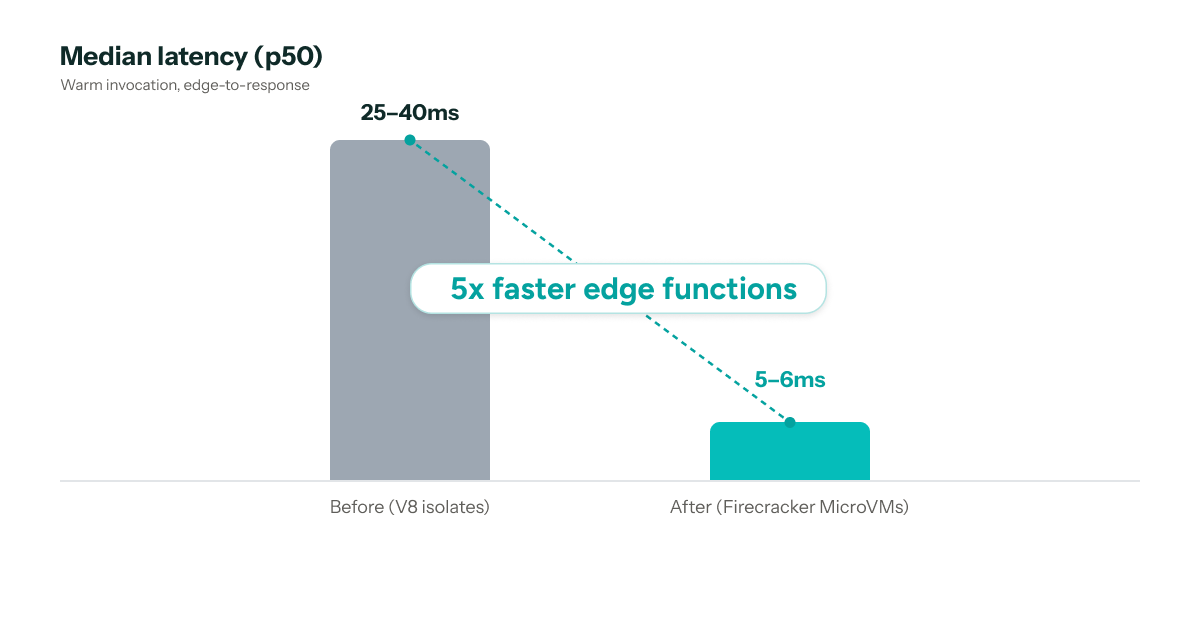
Over the past several months, our team has rebuilt the infrastructure behind Edge Functions, working closely with the team at Unikraft, who wrote about the experience from their side. In the past, requests went out to a hosted execution service. Today, they run on MicroVMs inside our own edge network — roughly 5x faster at the median. That shift also improves security and reliability, and opens up more possibilities for running complex compute at the edge.
This doesn’t change how Edge Functions are written or used — URL imports, npm packages, Node built-ins, netlify.toml declarations, local development — all of it works exactly as it did before. It’s now faster and more resilient. In this article we’d like to share more about the new architecture and our learnings on building a new compute platform that’s able to serve high volume at a low performance overhead.
The numbers, first
An edge function runs in front of a site, on every request that matches it. The time it takes is time a customer spends waiting, so milliseconds here count for more than they do almost anywhere else.
A warm invocation — routing to a compute node, entering a MicroVM, running the function, producing response headers — now costs:
- ~5–6ms at median (p50), down from 25–40ms on our previous infrastructure
- 47.4% faster p99 invocations
- 99.998% availability
- 5x faster edge function log delivery
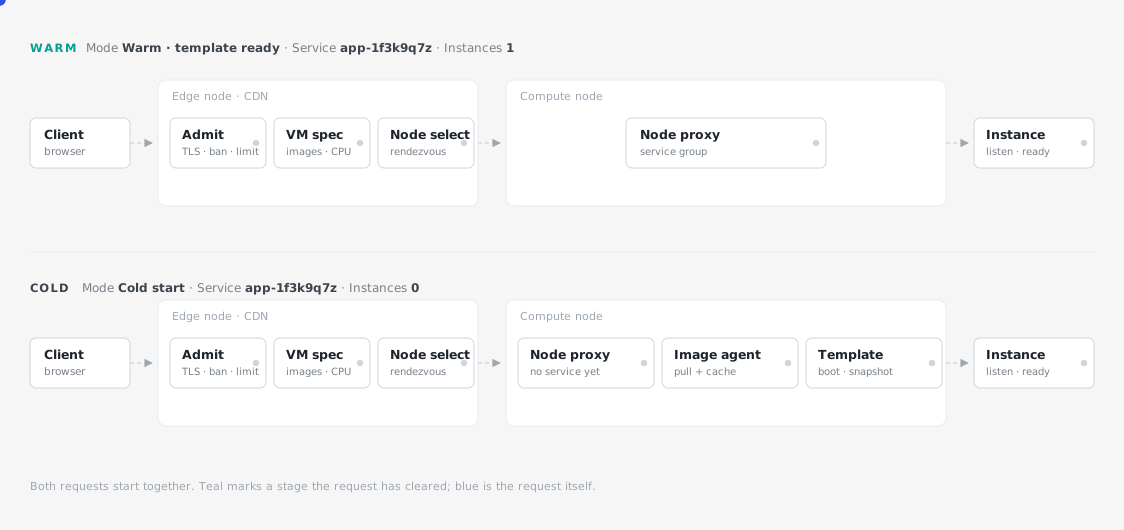
A cold invocation is worth stating too. When a request arrives in a region that no compute node has seen before, it needs to fetch the relevant images before it’s able to run anything. This happens on about 1.2% of invocations and takes about 9ms on average.
What happens during request time
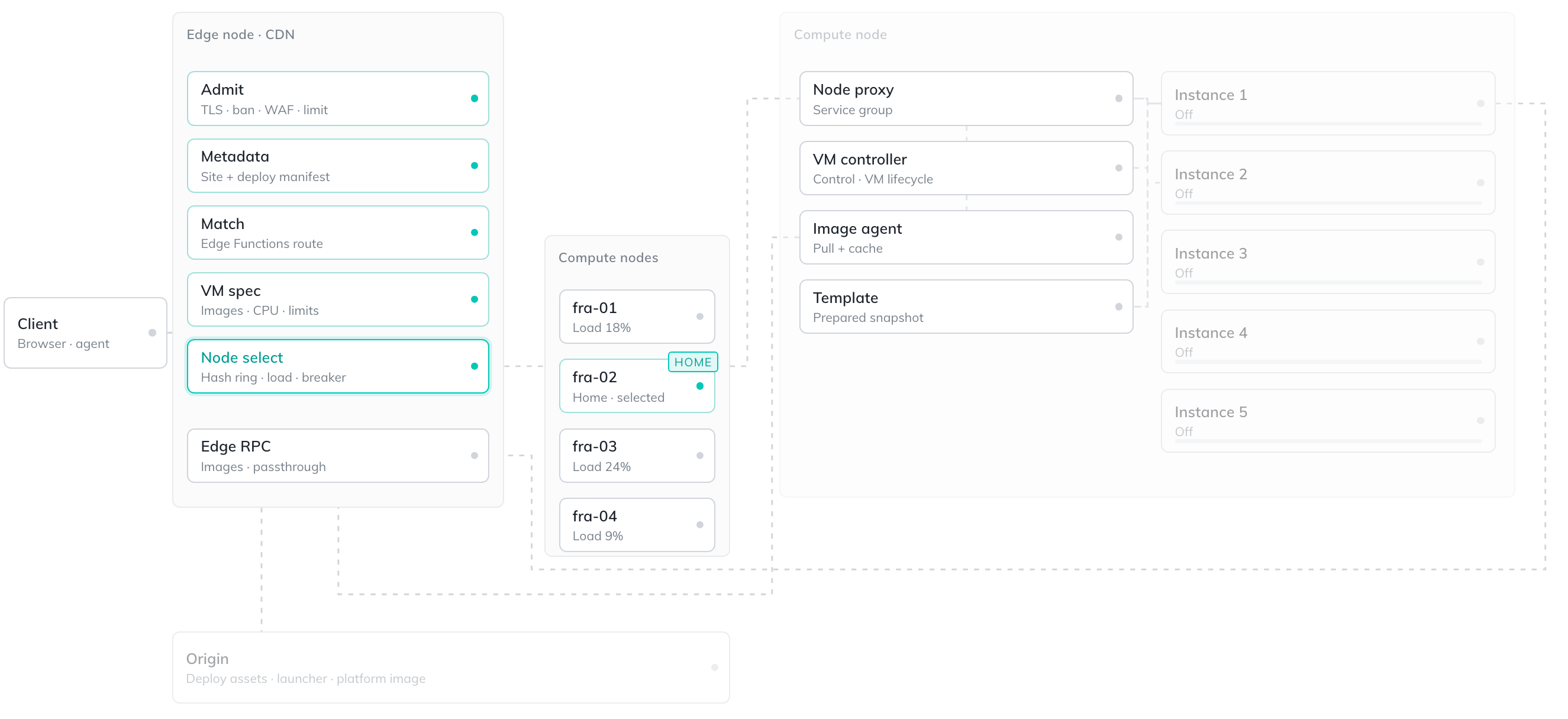
What follows is the path a single request takes, in order: it arrives at the edge node, it’s turned into a specification, is routed to a compute node, and then handed off to a MicroVM that may or may not already exist based on whether it’s a cold or warm invocation.
Request arrives at the edge node
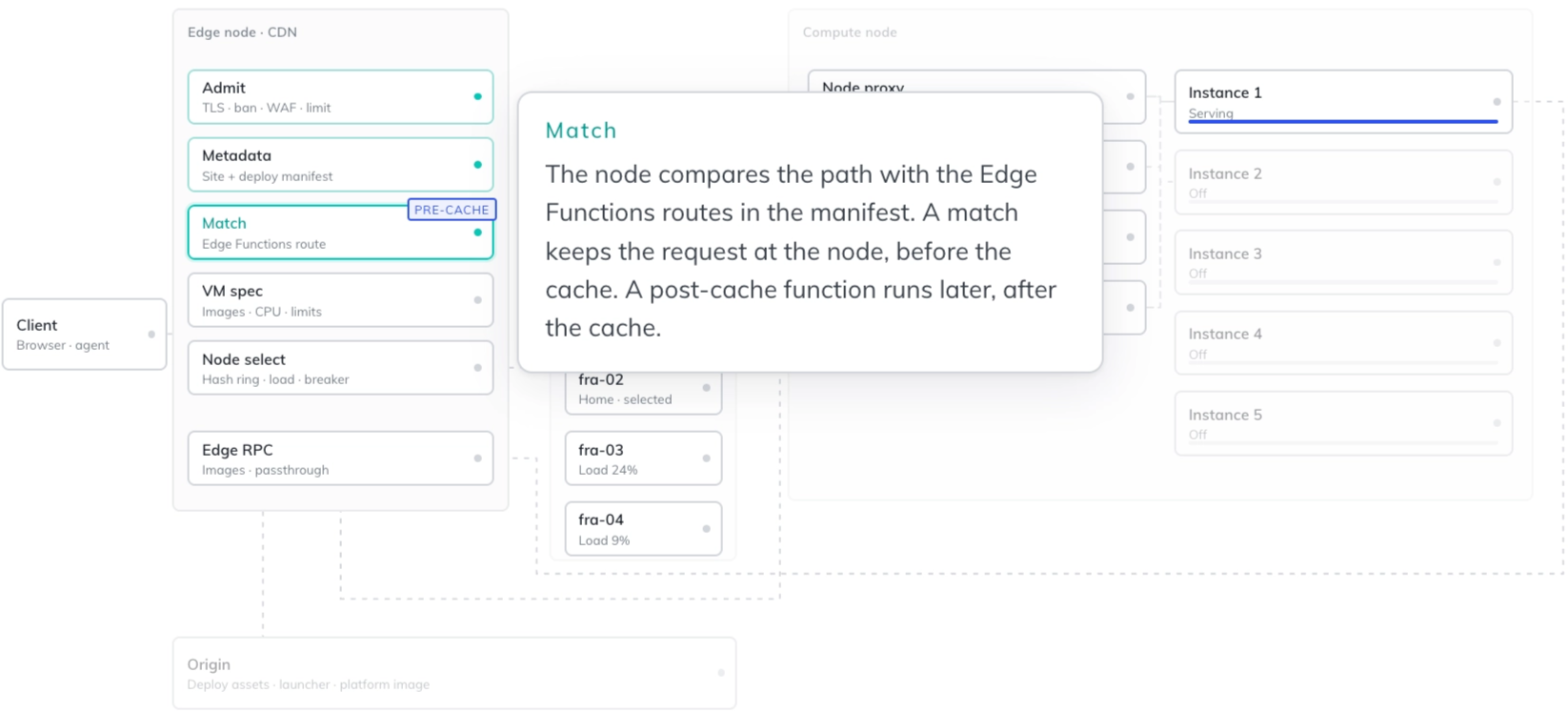
Every request lands on the Netlify edge node closest to the client. The node terminates the TLS connection and checks the request path against the Edge Functions’ routes for that deploy.
If nothing matches, the request carries on to the cache and onto the origin as usual. If a route does match, this is the point where the request used to leave our network. With our old infrastructure it went out over the internet, ran the edge function, and came back to us to pass on. With the new compute platform, the request is forwarded to a compute node within our network.
Creating an Edge Function service
When the compute node receives the request with the machine specification and the service ID, it first checks to see if a service with that ID already exists. If it does, it forwards the request into the service for it to send into the MicroVM. A service lets us have multiple MicroVMs associated with the same site’s Edge Functions, and allows us to configure parameters for when to scale MicroVMs in and out. For example, we configure each service to only allow a fixed number of requests to be handled by a MicroVM before we shut it down, to avoid MicroVMs running indefinitely. We use the same parameters to know when to eagerly boot up another MicroVM in anticipation of one shutting down.
If a service for the site’s edge functions doesn’t already exist on the compute node, one is created, and we check to see if we have all the images in the machine specification on disk. If any are missing, they’re fetched from the edge node and written to disk. This approach means we only fetch the edge function images that are receiving traffic in that region.
The edge node writes a spec
Before the request goes anywhere, the edge node writes a specification for the machine that will run a function. The spec names three images: the runtime, our platform image, and the edge function image. It also sets the CPU, memory, and connection limits.
The spec travels with the request, on every request. Its hash and site-specific information is computed to become a service ID. This allows for isolation, since two deploys with different code or different environment variables are different services, and they never share a MicroVM.
This isolation matters most for failures we don’t want to be possible. A potentially compromised deploy runs in a separate MicroVM, and even if it escapes the runtime, it cannot poison other customers or the compute layer itself. V8 isolates, no matter their name, do not provide this level of isolation.
Choosing a compute node to run an edge function
Each region has a group of compute nodes. The edge node picks one for the service using rendezvous hashing: the same service lands on the same node every time, which is what keeps a MicroVM warm and the code already on disk and in cache once it’s been read. This stickiness gives us a caching strategy. If we spread requests evenly across the swarm, we’d end up with a higher level of cold starts.
It’s important to remember that while sending every request for a function to the same compute node is the fast path, it’s also how a hot spot forms — where one busy function competes for resources with everything else on that box. A service taking a large share of a region’s traffic pinned to a single node will saturate the node at the expense of other services.
We balance this by relaxing the stickiness. Over a certain threshold, we spread the service across a slice of nodes. This lets us absorb sudden spikes in traffic from a single customer without affecting other services that hashed to the same node.
Finally, once a node is chosen, it pulls in the function’s code. A compute node that has served the function before already has it. A node seeing it for the first time fetches it once and caches it, so only the first request pays that cost.
Starting the MicroVM
Each function runs in its own Firecracker MicroVM. These are created in under a millisecond and start in about 2ms at p99, because the VM starts a stripped-down Linux environment rather than a full operating system. The edge function’s files are mounted as an uncompressed EROFS image and then memory-mapped, so the VM reads only the parts of the bundle it actually uses instead of loading all of it.
When the MicroVM boots up and the JavaScript server begins to listen on a port, we take a snapshot of the MicroVM. When the edge function isn’t being invoked, the MicroVMs running it scale to zero instead of sitting idle. The next time it’s invoked, we start a new MicroVM from that snapshot. The snapshot is memory-mapped, so the VM can start executing without waiting for the entire snapshot to be read back into memory.
The lifecycle of the VM — boot, snapshot, restore, and scale to zero — is the work of Unikraft’s product. We worked closely with them throughout the migration to make sure it holds up under our request volume and traffic patterns.
Running and response handling
After operating this project for several years, we already had learnings we incorporated to maximize performance and the ability to debug. At scale, we’ve run into all kinds of issues, from running out of ports on virtual switches to DNS (we were surprised, but it wasn’t always DNS).
In this iteration, we made sure compute nodes run local DNS resolvers. We’ve also expanded the metrics we collect, recording things like boot time, time to first port open, and time to start user code. There are also several circuit breakers in place to ensure prompt rerouting and decommissioning of compute nodes.
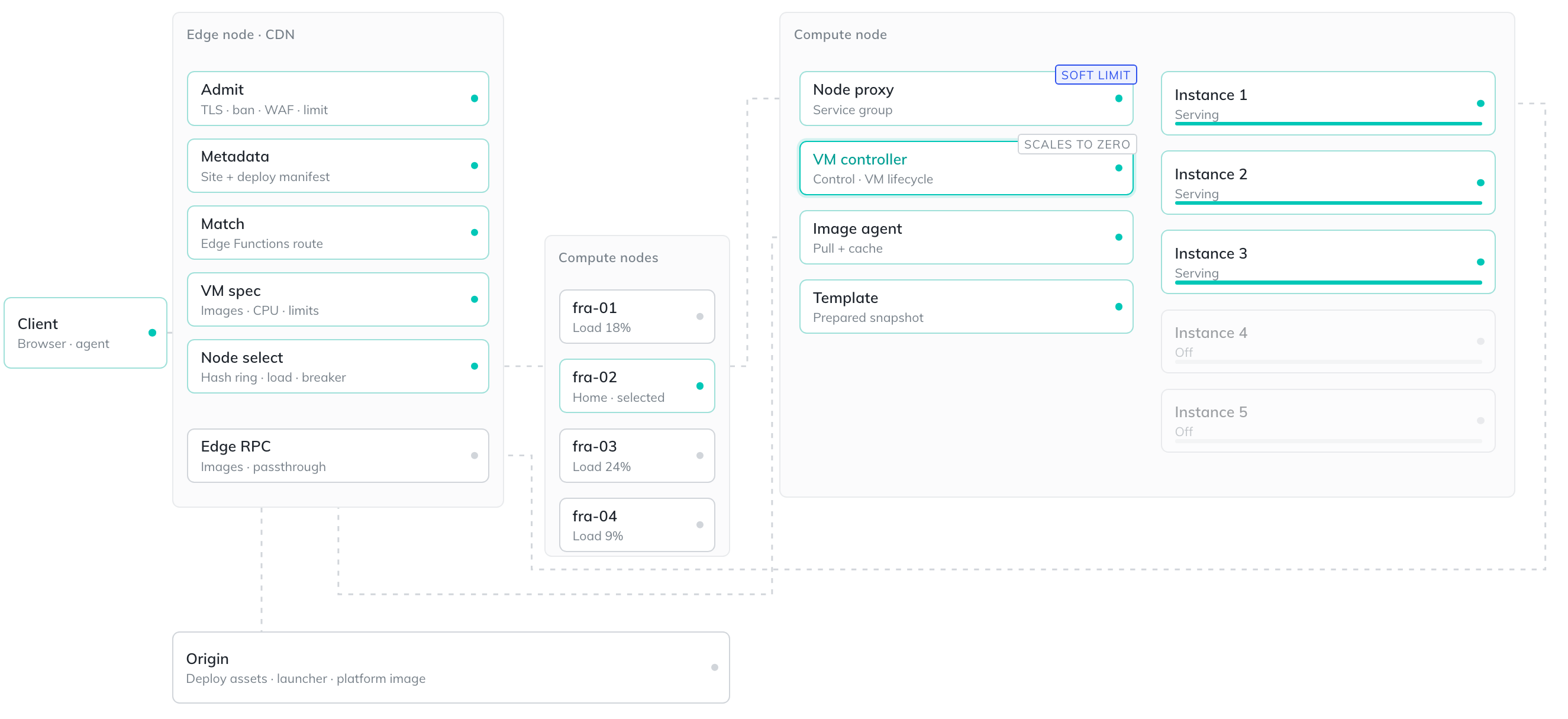
That’s the whole path, and on a warm instance it adds about 6ms. None of it leaves our network, and we’re in control of the whole request cycle. Everything above happens between the request arriving and the response going back out.
Designing resilient compute infrastructure
When you build a system like the one described above, you’re optimizing for two things at once: the end-user experience and rollout resiliency. We need to be able to roll out changes quickly but balance that with the ability to roll back just as quickly.
The compute nodes are built from a base image published by Unikraft and install a set of packages. These nodes are built separately from our edge nodes for a couple of reasons: it keeps our edge nodes lightweight and fast, it lets us use different instance types for our compute nodes, and it lets us scale these nodes independently.
A control plane keeps track of which compute nodes exist and which are healthy, and the edge nodes poll it for that list. It’s also what drives a deploy — a new fleet comes up alongside the running one, scales to match it, and takes over traffic only once it’s healthy.
Building the compute infrastructure has required close collaboration with the Unikraft team. Throughout the migration, we’ve worked with them on testing correctness, handling large volumes of requests, and building capabilities specific to our platform.
It’s live
The work to rebuild our edge compute architecture is more than just a speed boost. It’s a faster foundation we can keep building on and have more control over. The best part is that it’s already serving your production traffic today, at the same pricing, with no migration step and nothing to change in any project.
Running the compute ourselves means the ceiling on Edge Functions is ours to raise. Three things this makes tractable that weren’t before:
- npm package support, out of beta. npm packages work in edge functions today, in beta, with caveats around native binaries and importing files at runtime. A real VM with a real filesystem removes most of the reasons those caveats exist.
- Room to revisit the operation limits. The documented limits of 50ms of CPU per request, 512MB of memory, and 20MB of compressed code came from the isolate-based execution model.
- Compute inside our own network. Anything that depends on controlling the network path, instead of reaching a third party across the internet, is now something we can build.
We’re not done here. The limits and rough edges we couldn’t touch before are the ones we’re working on now, so stay tuned.