Most AI today still lives inside individual tools. CRMs get smarter. Support platforms suggest replies. Analytics dashboards add chat interfaces. Each one gets a little better at its own job.
But the problems GTM teams face don’t live inside any single tool. Knowing when a customer needs attention, or when something has quietly become critical, requires context spread across many systems at once. A form submission alone is ambiguous. Usage signals without support history are incomplete. No single system has enough perspective to make consistent, reliable judgments.
This is the shift playing out across the industry: AI is moving out of individual products and into agentic layers that sit above them, connecting systems, reasoning across signals, and surfacing insight rather than raw data.
At Netlify, we found ourselves right in the middle of that transition. So we built a solution: a GTM Agent that brings together signals from across our business to help our teams act faster, with better context, and with far less manual effort. This is the story of what we built, how Netlify’s own primitives made it possible, and what we learned along the way.
What We Built and What It Does
Before the GTM Agent, understanding a customer meant jumping between systems. A form submission in a CRM. Account details in another tool. Usage signals in internal dashboards. Billing data somewhere else. Support history in yet another place. None of these systems were wrong, but stitching them together took time and depended heavily on who was doing the research.
Each lookup added friction. Each context switch increased the chance of missing something important. As volume increased, insight became uneven and timing suffered.
We built the GTM Agent to do that work for us.
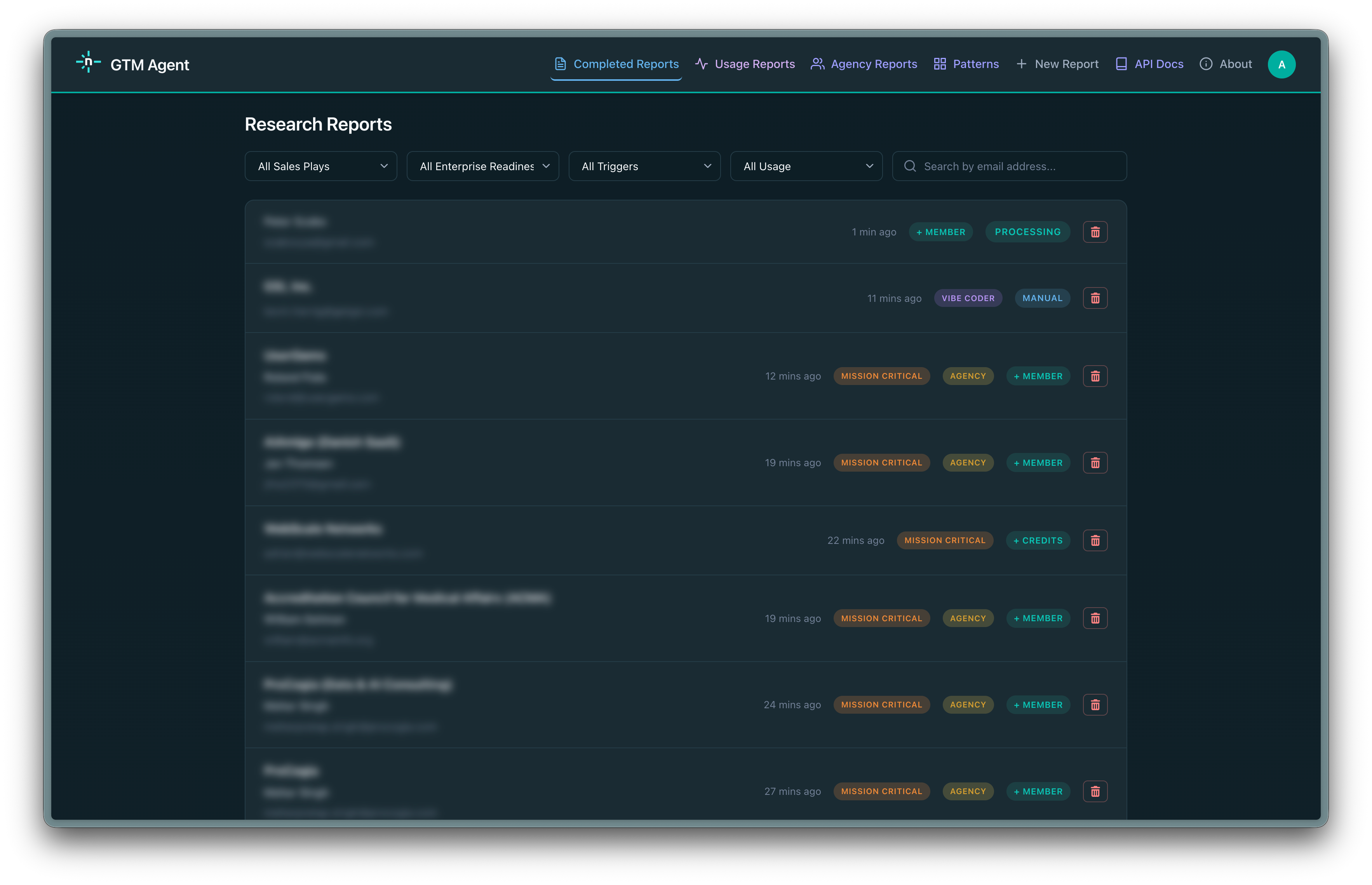
Instead of embedding AI inside a single tool, the GTM Agent looks across the signals that describe how customers are actually using Netlify, including direct requests, product usage, team activity, support history, billing behavior, analytics data, and CRM systems. Each signal is incomplete on its own. The agent reasons across them together to understand what is happening at a given moment.
The output is a clear explanation of what is happening and why it matters, delivered into the systems our teams already use. Humans remain in control of decisions and conversations, but they do so with far better information, far less manual effort, and context that improves over time as the agent learns from real outcomes.
Why Netlify Was Uniquely Positioned to Build This
Building an effective GTM agent is not just a model problem. It is an infrastructure problem. You need long-running execution for deep research, a clean way to connect internal and external systems securely, storage for caching and state, and a collaborative environment to iterate safely. Most teams assembling this from scratch spend weeks stitching services together before writing a single line of agent logic.
At Netlify, those primitives already existed. Background Functions gave us the long-running execution agentic workflows require to compile data. MCP gave us a consistent interface to connect the agent to internal tools and external systems without custom glue code for each one. Blobs gave us low-friction durable storage for caching research artifacts and maintaining state across runs. Agent Runners gave us a shared environment where the team could run the agent against real scenarios, compare outputs, and iterate on prompts collaboratively before anything touched production. AI Gateway enabled all the inference for the report and chat.
Each primitive is useful on its own. Together, they compressed months of setup into days and let us focus almost entirely on the reasoning layer. That speed of iteration matters as much as the architecture itself. The faster your feedback loop, the faster your agent gets reliable.
How the GTM Agent Works
The GTM Agent is an event-driven agentic workflow. Here’s how it moves:
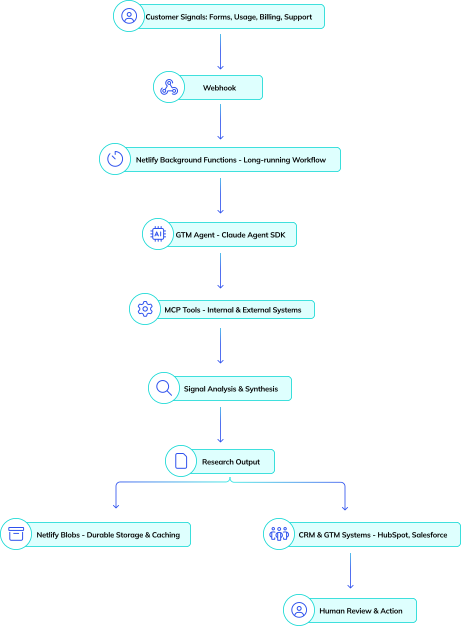
- Signals enter through webhooks - from forms, product events, account changes, and internal workflows. Webhooks are intentionally lightweight: validate the event, normalize it into a common shape, and trigger the workflow without making decisions inline.
- Each webhook starts a Netlify Background Function - giving the agent enough time to do real research across multiple systems, revisit assumptions as new data appears, and synthesize results without being constrained by short execution limits. Incoming events are acknowledged immediately. The deeper reasoning happens asynchronously and stored in blobs.
- The agent collects, reasons, and synthesizes - Gathering signals from CRM, product usage, billing, support history, and analytics. It uses internal MCP tools to fill in missing context, then produces a structured research artifact for human review.
Designing the Agent’s Reasoning
When designing an agentic system like this, the prompt is the system. Think of the prompt as a recipe. Just as a recipe specifies not only ingredients but sequence, ratios, and when to stop cooking, the system prompt specifies how the agent interprets signals, which ones require corroboration, and when enough context already exists to act. Treat it as an explicit specification for how the agent reasons, not just what it outputs.
In practice, that means writing down how your team reads signals today and encoding that into concrete rules the agent can follow. Be explicit about which signals are strong on their own, which require corroboration from other systems, and which should trigger additional tool calls. Just as important, define when the agent should stop. Teach it when the existing context is sufficient and when restraint is the correct outcome.
Our system prompt is substantial, intentionally so. Being verbose and domain specific produced far more reliable behavior than generic guidance. Over time, we refined it to reduce unnecessary lookups, improve how uncertainty is handled, and make the agent’s explanations clearer. Using the Claude Agent SDK made this practical, since it provides a strong harness for multi-step reasoning, tool invocation, and predictable iteration as the prompt evolves.
This is a part of the agentic process many teams skip: returning regularly to refine the system prompt using real outcomes is what separates a useful agent from a noisy one.
If you are building something similar, expect many iterations. Early versions will misread signals, overfetch data, or apply the right logic at the wrong time. The fastest way to improve is structured review: pull real agent outputs, sit down with the people who already make these judgments today, and walk through cases where the reasoning was off. What signal was missing? What was weighted too heavily? Adjust the prompt, rerun, and compare. This loop improves fastest when it combines people feedback and agent-on-agent feedback. Our Solution Architects regularly help teams do exactly this, working through which signals matter, how to encode business reasoning, and how to evolve prompts safely as more systems are added. The goal is not to make the agent smarter by adding more data, but to make its reasoning match how your business actually operates. When you get this right, the agent becomes a reliable layer for judgment rather than another source of noise.
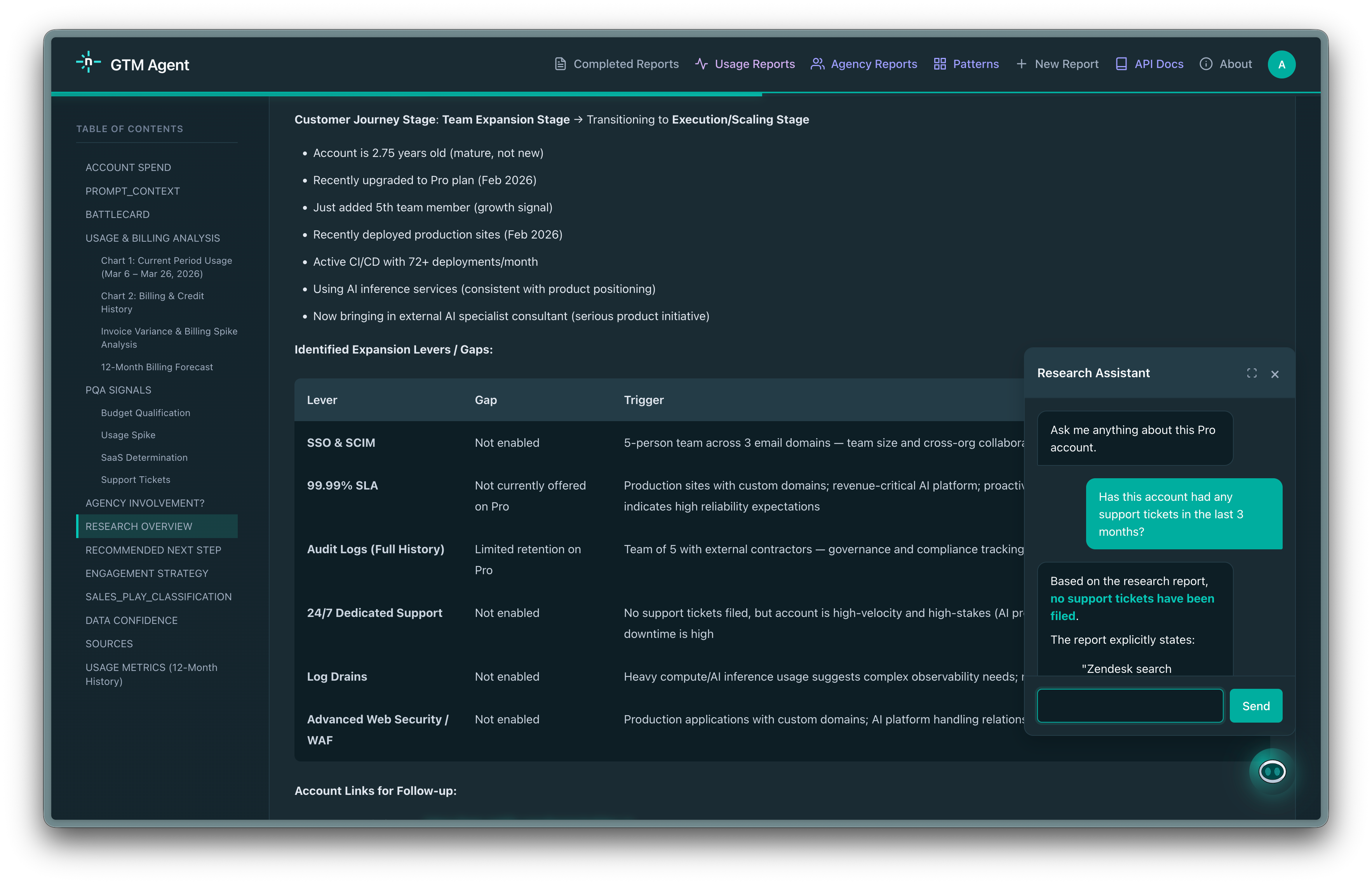
The initial research report answers the broad question: what is happening with this account, and what should we do? But sales conversations are specific. An AE preparing for a call might need to know how many seats the account has, whether there is an open support ticket, or what the company announced last quarter.
Instead of running a new research cycle, we built a chat interface directly into the report view. Each report includes a persistent conversation panel where AEs can ask follow-up questions in natural language. The chat is grounded in the full research report and has access to the same live tools the agent used during research. This includes internal APIs for real-time Netlify data, Orb for billing, Zendesk for support history, plus web search when needed.
This turns the research report from a static artifact into an interactive, account-specific knowledge base that stays current because the tools behind it query live data.
Iterating Safely with Agent Runners
Building the GTM Agent was a team effort, and it did not come together in a single pass. We built and iterated on it exclusively with Agent Runners, which gave our team a shared space to run the agent against real inputs, compare outputs side by side, and align on what good actually looks like before anything reached a live workflow.
In practice this looked like: one person updates the prompt, another runs it against a set of real scenarios, and the team reviews the differences together. Did the agent correctly identify urgency? Did it pull the right signals or go chasing noise? Those conversations, repeated across many iterations, are what made the system reliable. Agent Runners made that loop fast and collaborative rather than a slow back-and-forth over screenshots and Slack threads.
Having Background Functions, MCP, Blobs, and an AI Gateway all on the same platform meant we could add new signal sources and reasoning steps without rebuilding the surrounding infrastructure each time. The platform handled the operational complexity so the team could stay focused on improving the reasoning.
Today the GTM Agent is running in production, processing signals across our customer base and surfacing context to the teams who need it. It is not a finished product. We continue to refine the prompt, add signal sources, and adjust how the agent weighs what it finds. But it is reliable enough that our teams depend on it, and it keeps getting better. That is the goal: not a perfect agent on day one, but a system that improves continuously and earns trust over time.