For many years now, Netlify has provided a built-in feature for prerendering web pages. Even as hundreds of thousands of projects on Netlify actively use it every day, the need for this feature was steadily declining over time.
Two drivers contributed to this decline:
- Google and other search engine crawlers became better at running client-side rendering code to unlock page content
- Server-side Rendering (SSR) delivered all or most of a page’s content already baked in the HTML body.
But, something changed over the last year.
A combination of two significant factors has made prerendering a crucial need again for many sites. These changes also highlighted limitations of our old-standing feature, prompting us to rethink our approach to this topic.
So today, following a successful early access phase, we are announcing the general availability of a new Prerender extension.
Using the legacy prerendering feature? The new Prerender extension replaces our earlier prerendering feature.
If your project still uses the legacy version, you’ll need to migrate before it’s retired. Retirement begins in January 2026 and rolls out by plan tier. See the full timeline and migration steps in our changelog.
The new (x-)factors
At Netlify we’re front-row to changes taking place across the web, based on high-volume data from websites and web-apps of all sizes. We can clearly see changes in both the demand side - how users are now looking for content - and the supply side: how sites provide this content today.
The demand side
You don’t need me to tell you that more and more people turn to ChatGPT, Perplexity and AI chats as their go-to answer engine for everything. I certainly do.
What is much less known is that, these AI chats don’t execute client-side JavaScript, for a very simple reason:
When you ask AI chat for an answer, and you see it quickly looking up dozens of sources, it cannot run a browser-like environment for every page. It’d take too long for most queries.
Rather, the tools rely on a combination of an existing index as a baseline, plus very fast fetching and parsing of HTML content to get up-to-date data. But, you might think, isn’t server-side rendering already a solved problem anyway?
The supply side
One other big shift is AI coding agents, such as Bolt.new, Lovable, and others.
In many cases, these agents generate Single Page Applications (SPA’s). These sites are simpler for agents to create, run, and manage, but render content exclusively on the client side, fetching data from serverless API endpoints as necessary.
If you look at the actual HTML of these sites, you’d find an “empty shell” that’s mostly just loading the initial JavaScript bundle. On its own, this is not a problem.
However, the combination of AI tools only skimming through the server-served HTML body of web pages, and so many of today’s sites not having any meaningful content in that HTML, may lead to an actual discoverability issue for your site.
Prerendering: with and without
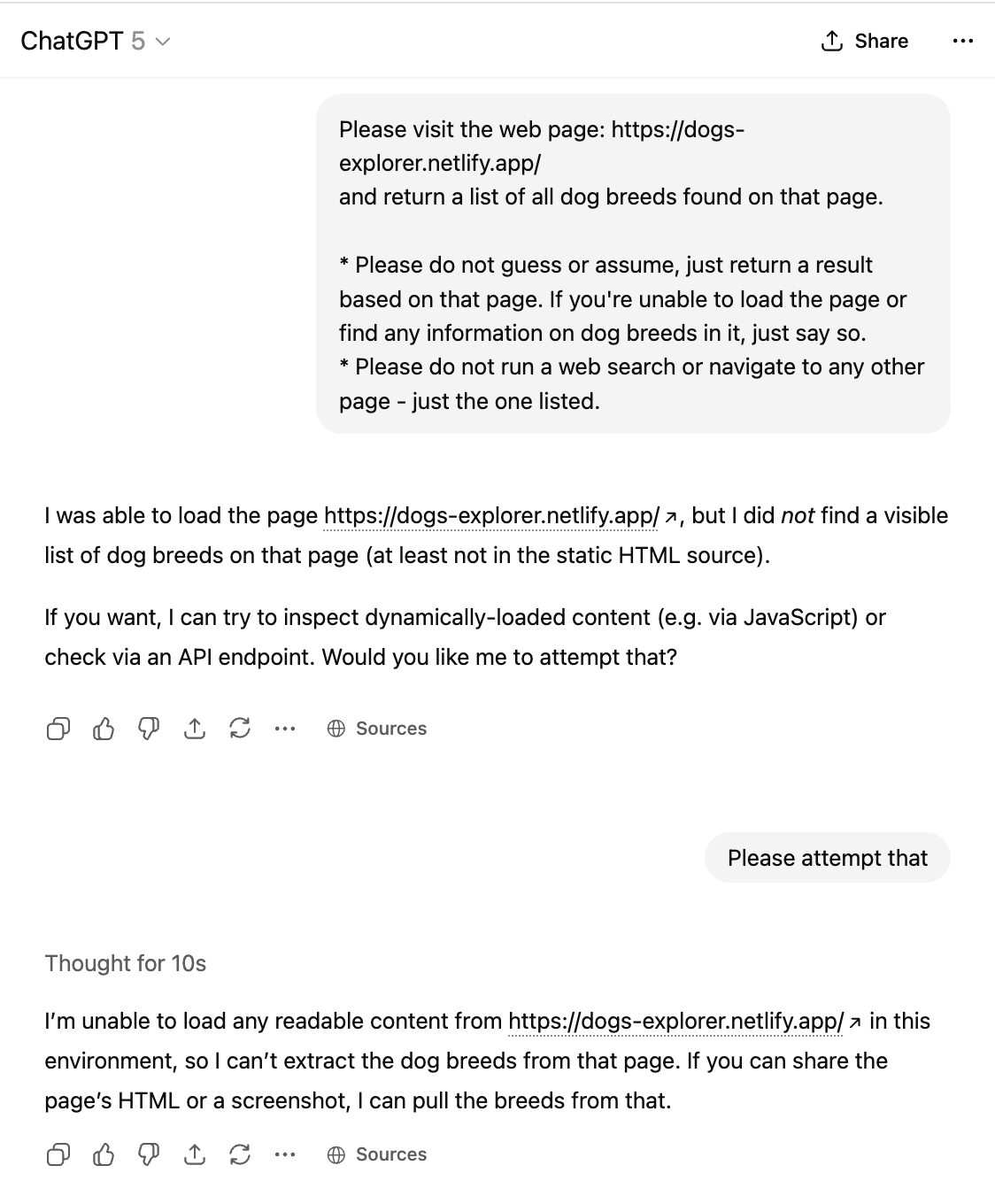
Before elaborating more on the new extension, here’s a concrete example using a simple vibe-coded website and ChatGPT.
I’ve created a minimal Dog Explorer website using the same toolset that many AI agents use (Vite and React). It shows a list of dog breeds by fetching that data from an API endpoint, but otherwise has no backend.
Then, I’ve deployed it twice:
If you visit both, they’d look exactly the same to you. But to ChatGPT, there’s a big difference. Here’s what happens without the extension:
And here’s what happens with the site that has the extension installed:

Do you need prerendering?
At Netlify, we don’t believe in enabling features by default if they don’t provide clear value. If you don’t need prerendering, enabling it would just be wasteful and add an un-necessary moving part to your setup.
Thus, we’ve created https://do-you-need-prerender.netlify.app/ to help answer this question for your site, helped by AI (but of course) to analyze the contents of your site.
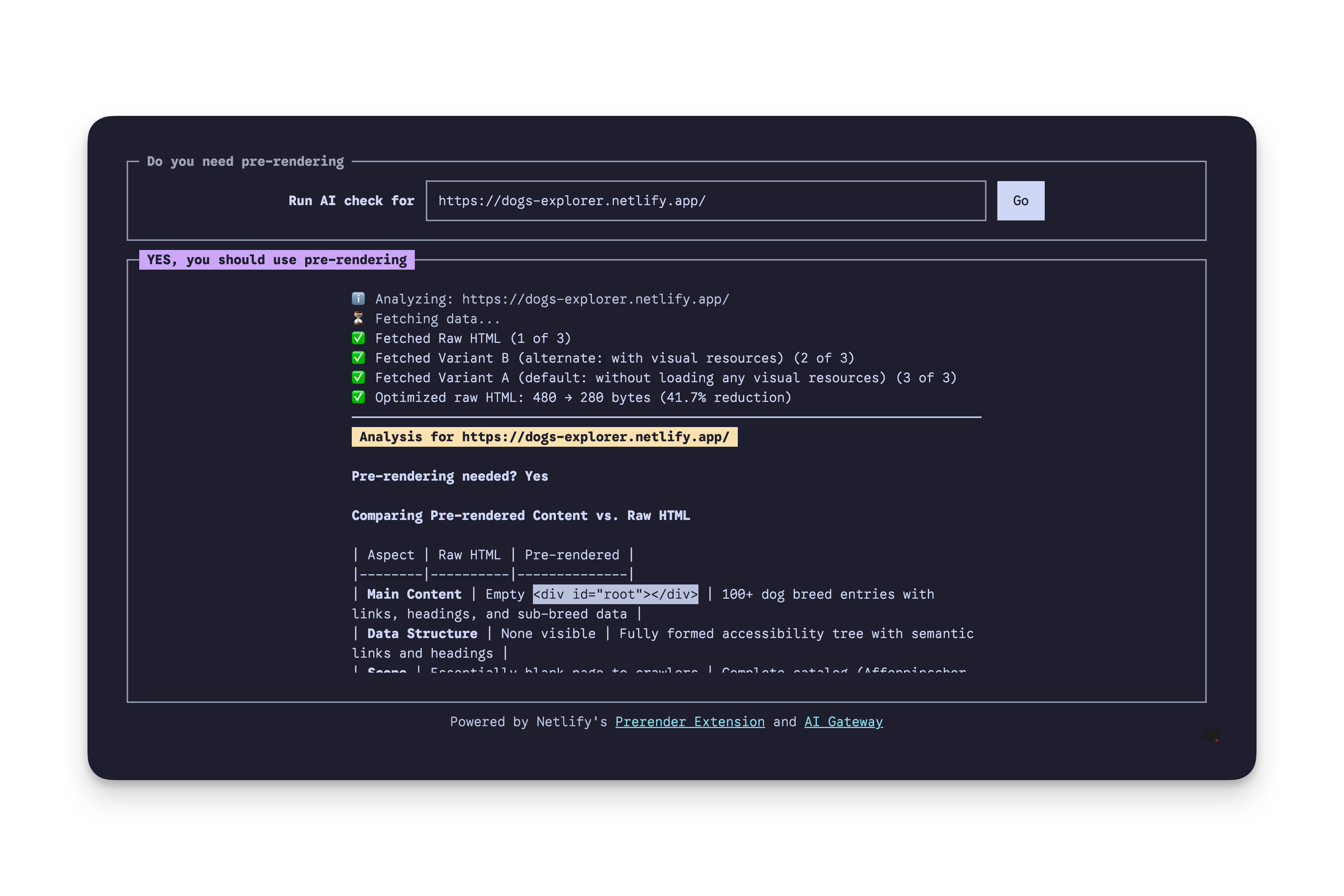
The tool is not biased for or against prerendering - it aims to provide a concrete, trusted assessment for your site.
Why we built a new extension
The older built-in Netlify feature, which is now legacy, had a major shortcoming: it lacked any visibility and configurability.
The feature was a black box. The headless browser that runs behind the scenes to prerender your sites can fail or be slowed down for a variety of reasons, but you had no way to know or fix these. The new extension comes with extensive logging and configurable settings.
It does this by being built on Netlify’s platform primitives:
- It adds an Edge Function to your site to intercept relevant requests only, based on the new user-agent categorization header.
- Relevant requests are rewritten to a Netlify Function that controls a headless Chromium browser and returns the prerendered HTML.
- Your extension’s optional configuration is stored in and read from a Netlify Blob.
Since everything is based on Netlify features, detailed logs and request-level data are shown in Netlify’s new Observability and log viewing pages.
The extension is also compatible with Netlify’s fine-grained caching. If the original content was purged from cache for any reason (e.g. due to a new deployment or on-demand invalidation), the prerendered version would be purged as well.
The public availability of all these powerful primitives is what made creating this extension feasible, with any account plan.
Availability, pricing, and support
The Prerendering extension is available to all account plans for free.
Note, any metered service that the extension uses, like Netlify Function invocations or traffic out, is billed normally based on your plan.
The Prerender extension comes with community support through our forums. We’ll continue to answer questions there and keep improving the documentation based on what we see in the wild.
Installing the extension
- First, if you’re using the legacy prerendering feature in a project today, disable it: go to Project Configuration->Build & Deploy->Scroll down to “Prerendering” and disable it.
- Click here to install the extension in your account. This makes the extension available to you, but does not automatically enable it for any project.
- When navigating to any of your projects, you will now have “Netlify Prerender Extension” in the bottom of your project sidebar. Click it and check “Enable prerendering”. Save the changes and re-deploy your project.
Retiring the legacy feature
Following the introduction of the new extension, we will gradually shut down the legacy prerendering feature. Learn more about how to migrate and the timeline in our changelog.