Changelog
-
OpenAI’s GPT-6.1 Sol model is now available through Netlify’s AI Gateway and Agent Runners with zero configuration required.
Use the OpenAI SDK directly in your Netlify Functions without managing API keys or authentication. AI Gateway handles everything automatically. Here’s an example using GPT-6.1 Sol with the Responses API:
import OpenAI from 'openai';export default async () => {const openai = new OpenAI();const response = await openai.responses.create({model: 'gpt-6.1-sol',input: 'Give a concise explanation of how AI works.',});return Response.json(response);};GPT-6.1 Sol is also available across Scheduled Functions, Background Functions, and Edge Functions. You get automatic access to Netlify’s caching, rate limiting, and authentication infrastructure.
Learn more in the AI Gateway documentation and Agent Runners documentation.
-
Agent Runners now shows you a preview right next to your prompt.
Previously, you’d get a link to the Deploy Preview and have to open it in a separate tab to see what the agent changed. Now the preview appears inline, so you can review the result and write your next prompt without switching back and forth. Plus, you can still access the Deploy Preview link if you need it.
This makes iterating with an agent feel more like a conversation. See what changed, spot what’s off, and follow up with the next instruction, all in one view.
Example flow
For example, say you’re building a strategic task organizer and prompt your agent to add a button that generates a quarterly impact report. Now you can watch your agent’s updates in the side preview next to your prompt.
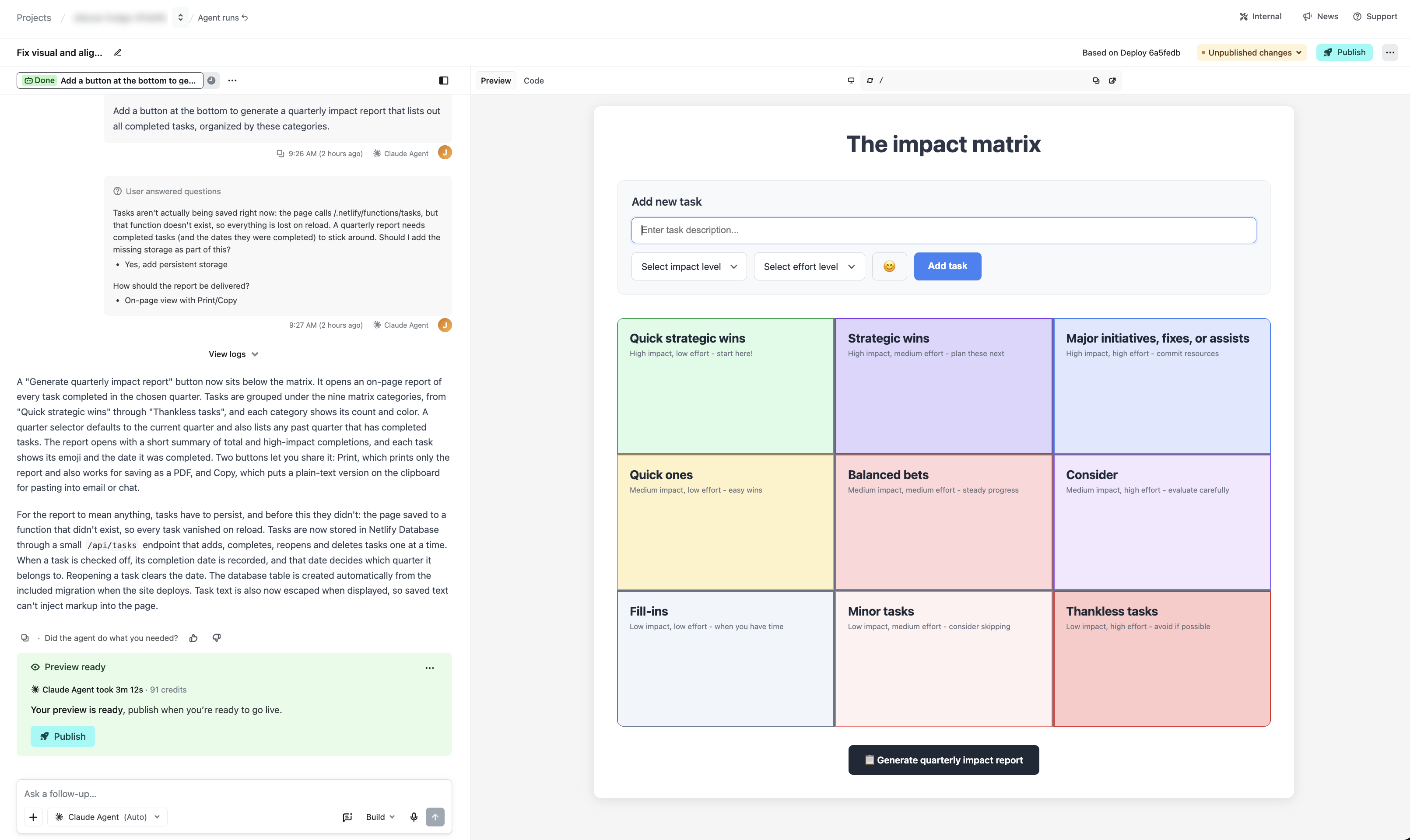
In this example, your agent on Netlify will also let you know if your project cannot save your tasks across browser sessions yet, and you can approve adding a database in the same view.
This is just one example of how Netlify gives you professional-grade capabilities, such as a real working database, with your agent of choice when you prompt with Agent Runners.
Try it out
See it in action when you start a new agent run or learn more about working with agents on Netlify.
-
Anthropic’s Claude Sonnet 5.5 model is now available through Netlify’s AI Gateway and Agent Runners with zero configuration required.
Use the Anthropic SDK directly in your Netlify Functions without managing API keys or authentication. AI Gateway handles everything automatically. Here’s an example using Claude Sonnet 5.5:
import Anthropic from '@anthropic-ai/sdk';export default async () => {const anthropic = new Anthropic();const response = await anthropic.messages.create({model: 'claude-sonnet-5-5',max_tokens: 4096,messages: [{role: 'user',content: 'How can AI improve my coding?'}]});return Response.json(response);};Claude Sonnet 5.5 is also available across Background Functions, Scheduled Functions, and Edge Functions. You get automatic access to Netlify’s caching, rate limiting, and authentication infrastructure.
Learn more in the AI Gateway documentation and Agent Runners documentation.
-
As part of our ongoing work to simplify the Netlify dashboard, we’ve added an activity feed to the project overview page. It’s available on all plans and adapts to how your project is set up.
Now when you open a project, the activity feed gives you a snapshot of your project’s latest updates, with quick access to:
- Production versions of your project, including the version last published
- Preview versions of your project
- Agent runs, so you can see what agents are working on and what you and your teammates have prompted
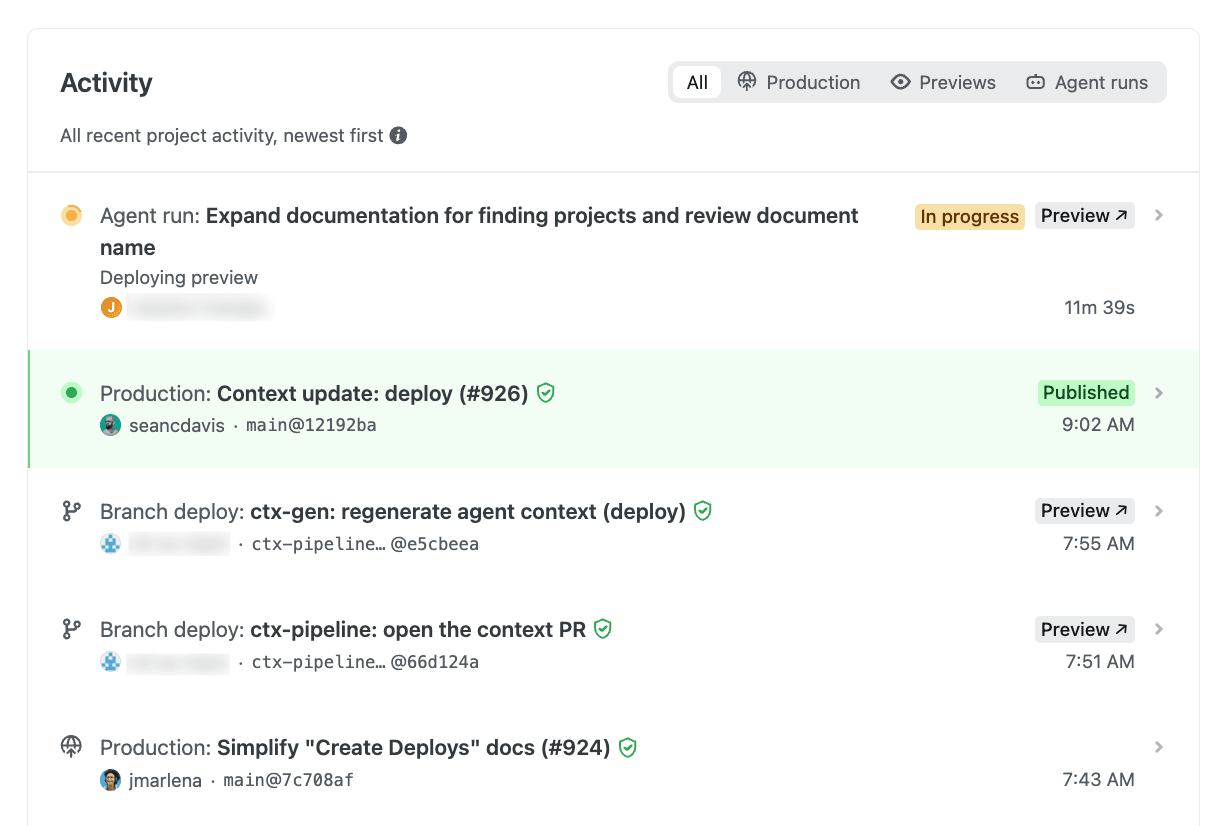
This means that instead of tracking down Production deploy links, Deploy Preview links, branch deploy links, and your agent runs list separately, you can now see where your project stands at a glance in one single spot.
The feed also suggests next steps to help you get started. It’s one of several dashboard improvements we’re gradually rolling out to simplify the Netlify experience, so you may have spotted a few already, with more to come.
-
The Next.js team has disclosed a critical severity vulnerability in an upstream dependency that can lead to remote code execution when
ImageResponserenders untrusted input. It is patched in 15.5.26 and 16.3.6. Applications that do not pass untrusted input intoImageResponseare not expected to be affected. Here’s what Netlify customers need to know.Vulnerabilities
- GHSA-vcvr-r3jv-pc5j / CVE-2026-94545 — Remote Code Execution in
next/ogImageResponse. Critical. Patched in 15.5.26 and 16.3.6.
Impact on Netlify
Netlify sites are affected only if they use
ImageResponseand the image it generates includes untrusted input — text, or an image loaded from the request. Sites that don’t useImageResponse, or that only render trusted content through it, are not affected.For sites that do, the impact is limited to a crashed function invocation, not code execution. On Netlify, this has minimal impact: our autoscaling serverless architecture means that a malicious request resulting in a crashed function does not affect other requests. However, active exploitation could increase your function costs.
What should I do?
We strongly recommend upgrading as soon as possible to patched releases:
next15.5.26 or later, or 16.3.6 or later, then redeploy.
Until you can upgrade, do not place untrusted input inside elements passed to
ImageResponse. Escape it as XML before rendering, or keep it out of the generated image entirely.Note that any publicly available deploy previews and branch deploys may remain vulnerable until they are automatically deleted. Consider deleting these deploys manually.
Resources
- GHSA-vcvr-r3jv-pc5j / CVE-2026-94545 — Remote Code Execution in
-
Anthropic’s Claude Opus 5.5 model is now available through Netlify’s AI Gateway and Agent Runners with zero configuration required.
Use the Anthropic SDK directly in your Netlify Functions without managing API keys or authentication. AI Gateway handles everything automatically. Here’s an example using Claude Opus 5.5:
import Anthropic from '@anthropic-ai/sdk';export default async () => {const anthropic = new Anthropic();const response = await anthropic.messages.create({model: 'claude-opus-5-5',max_tokens: 4096,output_config: { effort: 'medium' },messages: [{role: 'user',content: 'How can AI improve my coding?',},],});return new Response(JSON.stringify(response), {headers: { 'Content-Type': 'application/json' },});};Claude Opus 5.5 is also available across Background Functions, Scheduled Functions, and Edge Functions. You get automatic access to Netlify’s caching, rate limiting, and authentication infrastructure.
Learn more in the AI Gateway documentation and Agent Runners documentation.
-
OpenAI’s GPT-6 Sol and GPT-6 Luna models are now available through Netlify’s AI Gateway and Agent Runners with zero configuration required.
Use the OpenAI SDK directly in your Netlify Functions without managing API keys or authentication. AI Gateway handles everything automatically. Here’s an example using GPT-6 Sol with the Responses API:
import OpenAI from 'openai';export default async () => {const openai = new OpenAI();const response = await openai.responses.create({model: 'gpt-6-sol',input: 'Give a concise explanation of how AI works.',});return Response.json(response);};GPT-6 Sol and GPT-6 Luna are also available across Scheduled Functions, Background Functions, and Edge Functions. You get automatic access to Netlify’s caching, rate limiting, and authentication infrastructure.
Learn more in the AI Gateway documentation and Agent Runners documentation.
-
TypeSafe’s Jev model is now available through Netlify’s AI Gateway with zero configuration required.
Install
@typesafe-ai/sdkand use it directly in your Netlify Functions — no API keys to create, no provider config, no base URLs to wire up. AI Gateway handles credentials automatically, and usage is billed to your Netlify credits like every other model in the gateway.Jev is TypeSafe’s first “System One” model, and it works differently from the chat models you’re used to. Instead of generating prose, you send it your program state along with a set of typed questions, and it returns typed answers with calibrated probabilities. There are three question primitives:
choicepicks one option from a set,scorerates against ordered levels, andnoulreturns a yes/no probability between 0 and 1. Answers are constrained to the options you declare, so there’s no JSON parsing or schema coercion on your end.Every question in a request is evaluated in parallel against the same state, which means batching a dozen questions into one call costs little more than asking one. State and questions share a budget of roughly 32,000 tokens — about 150,000 characters of English text — and TypeSafe reports end-to-end response times of 70–500ms, making Jev a good fit for classification, routing, extraction, scoring, and guardrail checks on the request path. The SDK defaults to the
jev-latestalias, currentlyjev-1.13.0, and requires Node.js 20 or newer.Here’s a Function that routes an incoming contact form submission to sales, support, or spam:
import type { Config, Context } from "@netlify/functions";import { choice, TypeSafeClient } from "@typesafe-ai/sdk";export default async (req: Request, context: Context) => {const client = new TypeSafeClient();const { answers } = await client.systemOne({state: await req.json(),questions: {team: choice("Route this contact form submission", {sales: null,support: null,spam: null,}),},});return Response.json({team: answers.team.choice,requestId: context.requestId,});};export const config: Config = { path: "/api/route", method: "POST" };The
choicehelper declares the three possible destinations up front, soanswers.team.choicecomes back as one of them and nothing else, which makes the response safe to branch on directly. Each answer also carries a probability distribution and a confidence value, so you can act on high-confidence decisions and escalate the rest to a human.Learn more in the AI Gateway documentation and the TypeSafe documentation.
-
DeepSeek V4.1 Flash is now available through OpenRouter on Netlify’s AI Gateway with zero configuration required.
Use the OpenRouter SDK directly in your Netlify Functions without managing API keys or authentication. AI Gateway handles everything automatically. Here’s an example using DeepSeek V4.1 Flash:
import { OpenRouter } from '@openrouter/sdk';export default async () => {const client = new OpenRouter();const response = await client.chat.send({chatRequest: {model: 'deepseek/deepseek-v4.1-flash',messages: [{ role: 'user', content: 'How can AI improve my coding?' }],maxTokens: 400,},});return Response.json(response);};DeepSeek V4.1 Flash is available across Background Functions, Scheduled Functions, and Edge Functions. You get automatic access to Netlify’s rate limiting and authentication infrastructure.
Learn more in the AI Gateway documentation and OpenRouter documentation.