Posts tagged "Functions"
-
On private projects and sites protected with Netlify team login, your Netlify Functions and Edge Functions can now see who is making the request. The signed-in Netlify user is available as
context.user, with their user ID, email address, and when their access expires.This function returns the signed-in user’s ID, email address, and access expiry as JSON at
/whoami, and responds with a401whencontext.userisn’t set:netlify/functions/whoami.ts import type { Config, Context } from '@netlify/functions'export default async (req: Request, context: Context) => {if (!context.user) {return new Response('Unauthorized', { status: 401 })}return Response.json({id: context.user.id,email: context.user.email,expiresAt: context.user.expiresAt.toISOString(),})}export const config: Config = { path: '/whoami' }Previously, protecting a site meant Netlify checked who could visit, but your code couldn’t tell who they were. Knowing who’s on the other end meant adding a second login of your own on top.
Now Netlify verifies the visitor at the edge and passes their identity to your code. Because
context.usercomes from Netlify and not from the request, a visitor can’t impersonate someone else by sending their own headers.With
context.user, you can build on the login your team already uses. Examples like:- Internal dashboards and admin tools that show each person their own data
- Audit logs that record who made a change or triggered an action
- Approval and review workflows that know who approved what
- Per-person settings, permissions, or feature access inside an internal app
Learn more in the Netlify documentation:
-
New sites created on Netlify now use Node.js 24 by default for both builds and Netlify Functions.
Existing sites aren’t affected — they keep using whatever Node.js version they’re currently pinned to, whether that’s set via a
NODE_VERSIONenvironment variable, an.nvmrc/.node-versionfile, or theengines.nodefield inpackage.json.If you want to move an existing site to Node.js 24, follow the Node.js version configuration guide for builds, and the functions runtime version guide for Netlify Functions.
-
We have redesigned Netlify functions for an improved agent experience.
With these updates, functions are more discoverable, easier to autocomplete, update, and manage for people and agents alike. They move function configuration into code, making it type-safe and immediately visible to editors, tools, and agents, with no platform-specific naming conventions to memorize or get wrong. None of these changes are breaking, so you can adopt them on your own timeline.
Netlify Functions are serverless functions that run on-demand in response to HTTP requests or platform events. They handle server-side logic without any infrastructure to manage, and live in your repository at
netlify/functions/.To learn more about these updates in depth, check out our blog on redesigning Netlify functions for agent experience. See the table below for a summary.
Feature What changed What it means for agents What you need to do Event handlers Export typed event handlers from the default export object Typed handlers are discoverable like any API, with no magic filenames to guess or get wrong. Nothing required. Adopt the new syntax for new event handlers for better agent discoverability and updates. Background functions Declare with background: truein config instead of the-backgroundfilename suffixType-safe and config-driven, not name-driven. Agents can set it in code without guessing platform naming conventions, and get an error if the value is wrong. Nothing required. The -backgroundsuffix still works.Region selection Set per-function via the regionconfig property, replacing the global UI settingAgents can set region as a type-safe config property, catching invalid values before deploy rather than at runtime. Use deploy previews to test before going live. Nothing required. Optionally move region out of the UI into config for per-function control. Memory and vCPU Set via memoryorvcpuconfig properties; both values scale together automaticallyAgents provisioning compute-heavy workloads (inference, large payloads) can do so in code. Nothing. Defaults unchanged. Set only if your workload needs more than 1 GB / 0.5 vCPU. Requires a credit-based Pro plan. getContext()Named import from @netlify/functions, replacing theNetlify.contextglobalNamed imports surface in autocomplete and carry type information. Globals are invisible to agents; named imports are not. Nothing required. Netlify.contextstill works. Switch togetContext()for better discoverability.Learn more in the Netlify Functions documentation, which has also been recently revamped.
-
You can now use as many environment variables as your Serverless Functions need. The 4KB total size limit on environment variables no longer applies to functions running on the current Netlify Functions runtime.
This limit was a common source of friction. Teams with several API keys, connection strings, or feature flags could quietly bump into the cap and see their functions fail to deploy or run, often with confusing errors. With the limit gone, you no longer have to ration space or work around the ceiling for the configuration your functions legitimately need.
The limit still applies to functions running in Lambda compatibility mode. If your functions are using Lambda compatibility mode and you want to remove the size limit entirely, consider upgrading to the current Netlify Functions runtime.
Learn more about environment variables in Netlify Functions in our documentation.
-
The Node.js team has released a security update addressing a denial-of-service vulnerability affecting applications that use
async_hooks(including in dependencies). Here’s what Netlify customers need to know.Vulnerability
When
async_hooksare enabled on certain versions of Node.js, a stack overflow causes the Node.js process to exit immediately rather than throw a catchable error. This bypassestry-catchblocks and uncaught exception handlers entirely.A malicious actor could send a crafted payload to crash a server.
Note that many common tools and frameworks use
async_hooksunder the hood, notably APM and tracing tools (e.g. DataDog, NewRelic, OpenTelemetry) as well as Next.js App Router and other React Server Components implementations. You can find more details on that here.Impact on Netlify
This is a server-side denial-of-service (DoS) vulnerability. On Netlify, this has minimal impact: our autoscaling serverless architecture means that a malicious request resulting in a crashed or hung function does not affect other requests. However, active exploitation could increase your cold starts and your function costs.
Note that Node.js used during your project’s build is not impacted at all.
What should I do?
If you have opted your Netlify Functions into Node.js 18, we recommend upgrading to Node.js 20 or later. Node.js 18 reached end-of-life in April 2025 and thus will not be patched.
Otherwise, there is no action for you to take. Although this CVE’s impact to Netlify sites is limited, deployed Netlify Functions will be updated to patched Node.js versions automatically on a rolling basis.
For completeness, please note that the Node.js version used during your project’s build is not relevant to this CVE. There is no action for you to take and this will not be automatically patched.
Resources
-
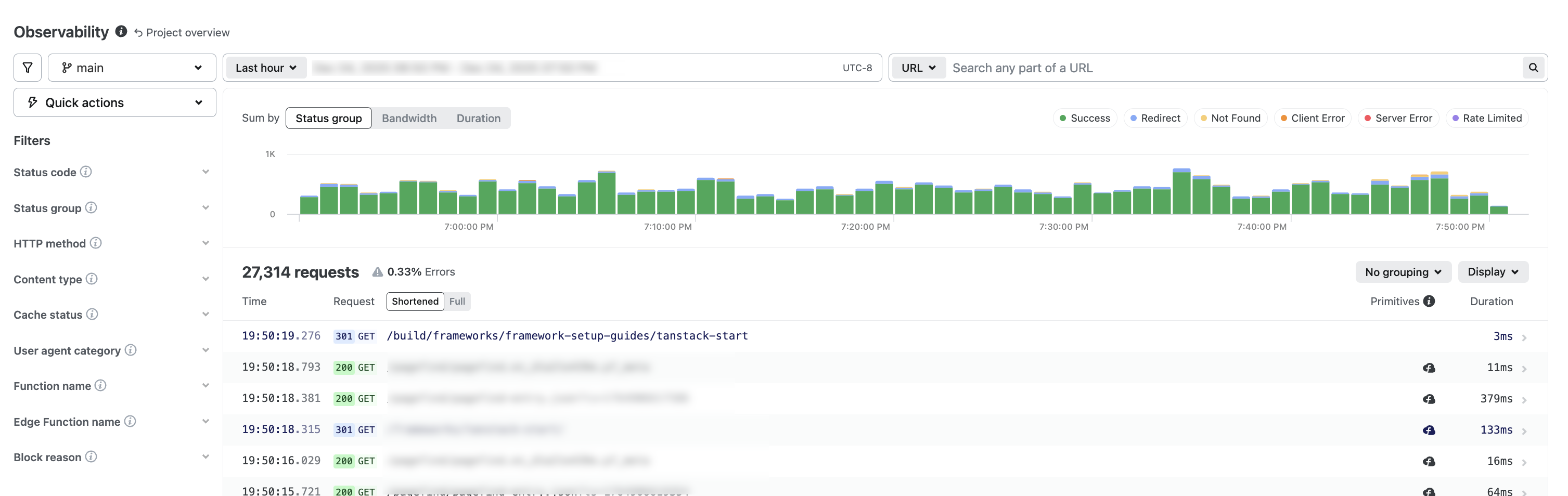
Netlify Observability offers real-time visibility into your project’s production performance and resource usage.
Monitor requests, bandwidth, runtime behavior, functions, and Edge Functions to understand how your web project operates in production, fix errors, and optimize web performance.
Get a deep feature tour from our Observability blog post.
Try Observability
From your project overview, select Logs & metrics > Observability. To expand details for a request, select a request.
Availability
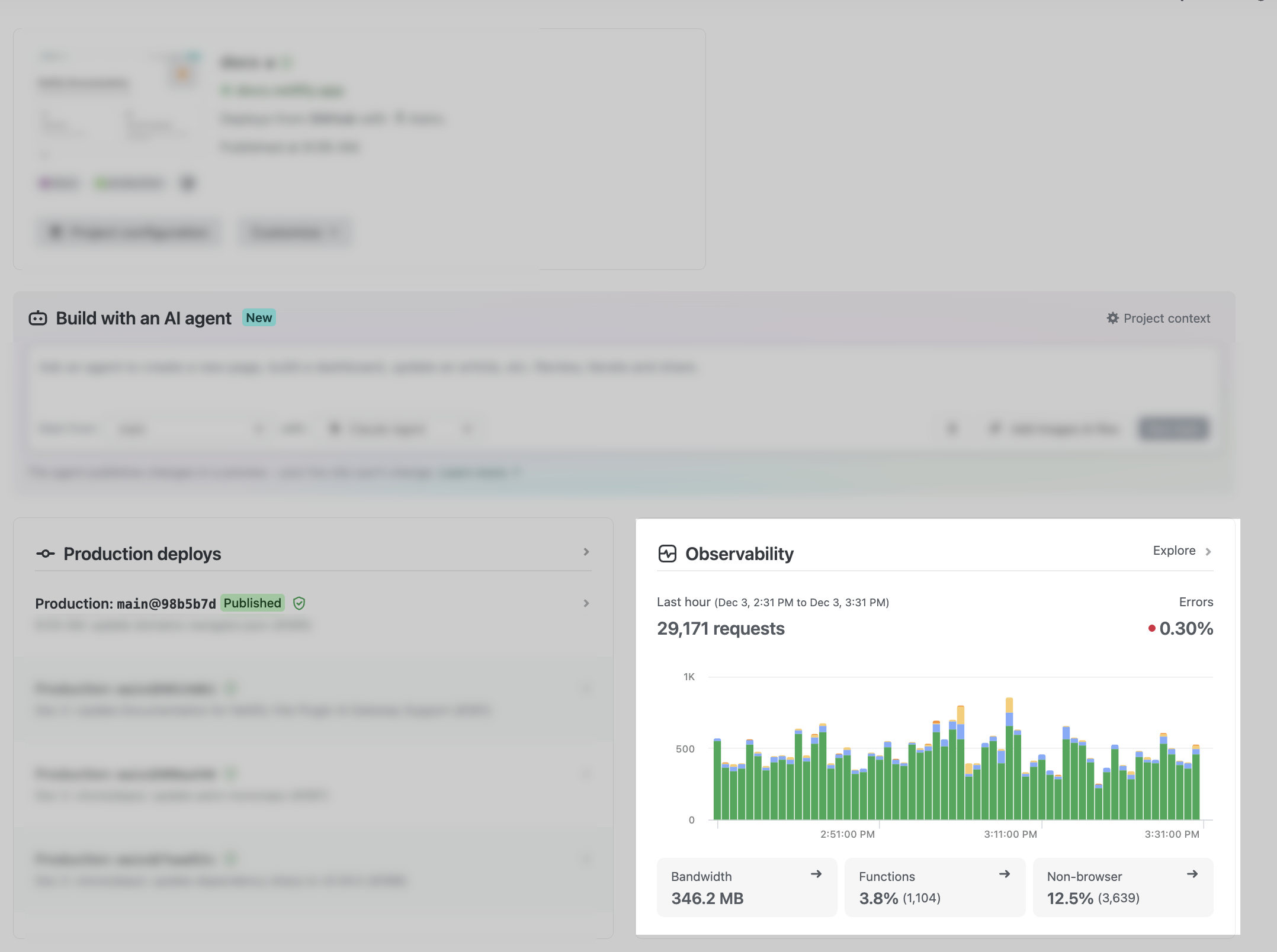
Observability is available for Credit-based plans and Enterprise plans. If you have a Legacy pricing plan, you can get a sneak peek at your observability data by checking out the widget from your Project Overview.
Credit-based plan Time filter available Free Past 24 hours Personal Past 7 days Pro Past 30 days Enterprise plan Time filter available Any opted-in Enterprise plan Past 30 days Note that if you have a Credit-based plan or have Observability enabled for an Enterprise plan, then Function Metrics will no longer be available to you as it is replaced by Observability.
If you do not have Observability, then Function Metrics will continue to be available to you.
Learn more in our Function metrics docs.
Other monitoring updates
As part of monitoring updates, we have also updated the names of some of our monitoring features.
Old name New name Real User Metrics Real User Monitoring Project analytics (formerly site analytics) Web analytics Further info
To learn more, check out Observability docs.
-
Netlify and Sentry provide a powerful combination of tools that help developers build, deploy, and monitor your web projects with ease and accuracy. The latest Sentry integration provides error monitoring for Netlify Functions, Background & Scheduled Functions.