Changelog
-
Agent Runners are now better at completing their work when a run has less credits remaining than the task requires.
If you are close to running our of credits during a run, the agent will start focusing on delivering the most useful result it can with the credits it has left. It finishes work already in progress, leaves the project in a working state, and provides a clear summary of what it completed.
Previously, an ambitious task could end abruptly before the agent wrapped up, leaving partial changes and little explanation. Now, you’re more likely to get a working result you can use right away, or a solid, clearly documented starting point for your next run.
This improvement applies automatically to every agent and model available in Agent Runners. There’s nothing to enable or configure. Learn more in Make changes with Agent Runners and how credits work.
-
Sharing your Netlify projects is now faster with built-in social media share buttons.
When you’re ready to show off what you’ve built, you can share your project directly to X, LinkedIn, Reddit, Facebook, or Bluesky. Choose your preferred platform and Netlify opens a ready-to-publish post with your project link, so you can reach your community with fewer steps.
-
You can now connect repositories hosted on Cursor Origin to Netlify, so every Git push deploys an updated version of your project at a preview URL or a production URL.
Netlify supports Cursor Origin with continuous deployment, meaning that once your codebase’s repo is connected, Netlify will automatically:
- Build and deploy your project with every git push
- Build Deploy Previews for your pull requests
- Send deploy notifications to your pull request comments on Cursor Origin so you can check preview URLs there
Requirements
Cursor Origin uses OAuth authentication, so connecting a repo works much like our existing Azure DevOps support: the Cursor user who authenticates needs access to the Cursor Origin codebase that owns the repository.
To use Cursor Origin with Netlify, you do not need a specific pricing plan with Netlify.
Support scope
Note that features outside of continuous deployment, such as Agent Runners and the Netlify Drawer, are not supported at this time.
Get started
To learn more, check out these docs:
-
OpenAI’s ChatGPT Images 2.5 models are now available through Netlify’s AI Gateway and Agent Runners with zero configuration required. Use
gpt-image-2.5-flareorgpt-image-2.5-sunburstto generate images for your applications.Use the OpenAI SDK directly in your Netlify Functions without managing API keys or authentication. AI Gateway handles everything automatically. Here’s an example using the
gpt-image-2.5-flaremodel:import OpenAI from 'openai';const ai = new OpenAI();export default async (req, context) => {const response = await ai.images.generate({model: 'gpt-image-2.5-flare',prompt: 'A golden retriever working at a laptop in a sunny startup office',size: '1024x1024',quality: 'low',output_format: 'jpeg',output_compression: 80});const imageBuffer = Buffer.from(response.data[0].b64_json, 'base64');return new Response(imageBuffer, {status: 200,headers: {'content-type': 'image/jpeg','cache-control': 'no-store'}});};Both ChatGPT Images 2.5 models are available across standard Functions, Background Functions, Scheduled Functions, Edge Functions, and Agent Runners. You get automatic access to Netlify’s caching, rate limiting, and authentication infrastructure.
Learn more in the AI Gateway documentation and Agent Runners documentation.
-
Agent Runners can now scope ambitious prompts for new projects to create a partial working project and provide next steps within the available credit budget.
Previously, a brand new project could use up its credit budget before the agent finished for ambitious prompts, leaving the run marked Cancelled partway through.
Now, your agent scopes the work more intelligently. It builds out part of the project and shares a plan for next steps, so you can preview a working version within your new project credit budget instead of the run stalling out.
Learn more in Make changes with Agent Runners.
-
OpenAI’s GPT-6 Astra model is now available through Netlify’s AI Gateway and Agent Runners with zero configuration required.
Use the OpenAI SDK directly in your Netlify Functions without managing API keys or authentication. AI Gateway handles everything automatically. Here’s an example using GPT-6 Astra with the Responses API:
import OpenAI from 'openai';export default async () => {const openai = new OpenAI();const response = await openai.responses.create({model: 'gpt-6-astra',input: 'Give a concise explanation of how AI works.',});return Response.json(response);};GPT-6 Astra is also available across Background Functions, Scheduled Functions, and Edge Functions. You get automatic access to Netlify’s caching, rate limiting, and authentication infrastructure.
Learn more in the AI Gateway documentation and Agent Runners documentation.
-
Google’s Gemini 3.8 Flash model is now available through Netlify’s AI Gateway and Agent Runners with zero configuration required.
Use the Google GenAI SDK directly in your Netlify Functions without managing API keys or authentication. The AI Gateway handles everything automatically. Here’s an example using the Gemini 3.8 Flash model:
import { GoogleGenAI } from '@google/genai';export default async () => {const ai = new GoogleGenAI({});const response = await ai.models.generateContent({model: 'gemini-3.8-flash',contents: 'How can AI improve my coding?'});return Response.json(response);};Gemini 3.8 Flash is available for all Function types and Agent Runners. You get automatic access to Netlify’s caching, rate limiting, and authentication infrastructure.
Learn more in the AI Gateway documentation and Agent Runners documentation.
-
Anthropic’s Claude Fable 5.1 model is now available through Netlify’s AI Gateway and Agent Runners with zero configuration required.
Use the Anthropic SDK directly in your Netlify Functions without managing API keys or authentication. The AI Gateway handles everything automatically. Here’s an example using the Claude Fable 5.1 model:
import Anthropic from '@anthropic-ai/sdk';export default async () => {const anthropic = new Anthropic();const response = await anthropic.messages.create({model: 'claude-fable-5-1',max_tokens: 4096,messages: [{role: 'user',content: 'How can AI improve my coding?'}]});return new Response(JSON.stringify(response), {headers: { 'Content-Type': 'application/json' }});};Claude Fable 5.1 is available for all Function types and Agent Runners. You get automatic access to Netlify’s caching, rate limiting, and authentication infrastructure.
Learn more in the AI Gateway documentation and Agent Runners documentation.
-
Netlify now creates a Deploy Preview for every pull request in a GitHub stack when the stack ultimately targets your project’s production branch (usually
main). You can review and share each layer of a larger change before it merges.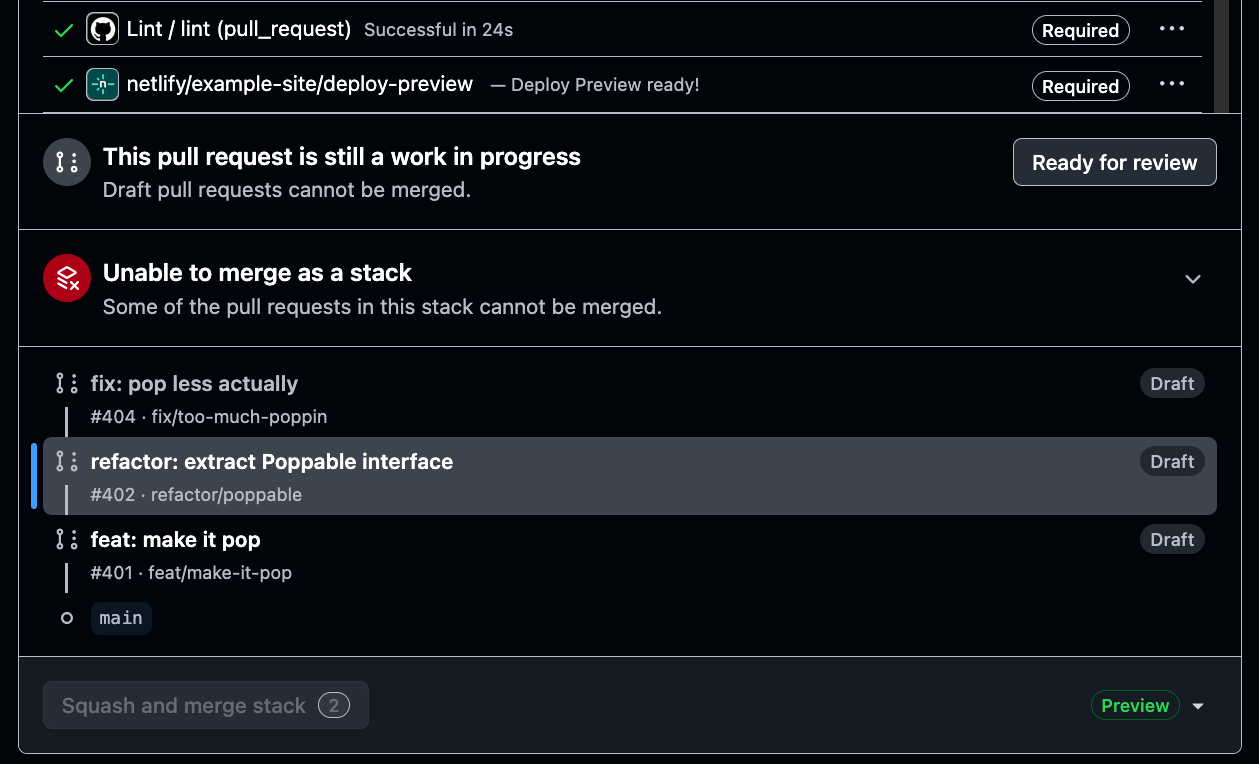
GitHub Stacked Pull Requests help teams split a larger update into smaller, connected pull requests. Each pull request can focus on one step of the work, making changes easier to review and merge in sequence.
Previously, Netlify only created a Deploy Preview for the first pull request in your stack while additional pull requests in the stack didn’t get their own Deploy Previews. Now, every pull request in the stack gets its own Deploy Preview.
There’s nothing new to configure. Create and update your stack in GitHub as usual, and Netlify automatically adds a Deploy Preview to each eligible pull request.
Learn More