Posts tagged "Devtools"
-
You can now connect repositories hosted on Cursor Origin to Netlify, so every Git push deploys an updated version of your project at a preview URL or a production URL.
Netlify supports Cursor Origin with continuous deployment, meaning that once your codebase’s repo is connected, Netlify will automatically:
- Build and deploy your project with every git push
- Build Deploy Previews for your pull requests
- Send deploy notifications to your pull request comments on Cursor Origin so you can check preview URLs there
Requirements
Cursor Origin uses OAuth authentication, so connecting a repo works much like our existing Azure DevOps support: the Cursor user who authenticates needs access to the Cursor Origin codebase that owns the repository.
To use Cursor Origin with Netlify, you do not need a specific pricing plan with Netlify.
Support scope
Note that features outside of continuous deployment, such as Agent Runners and the Netlify Drawer, are not supported at this time.
Get started
To learn more, check out these docs:
-
Netlify now creates a Deploy Preview for every pull request in a GitHub stack when the stack ultimately targets your project’s production branch (usually
main). You can review and share each layer of a larger change before it merges.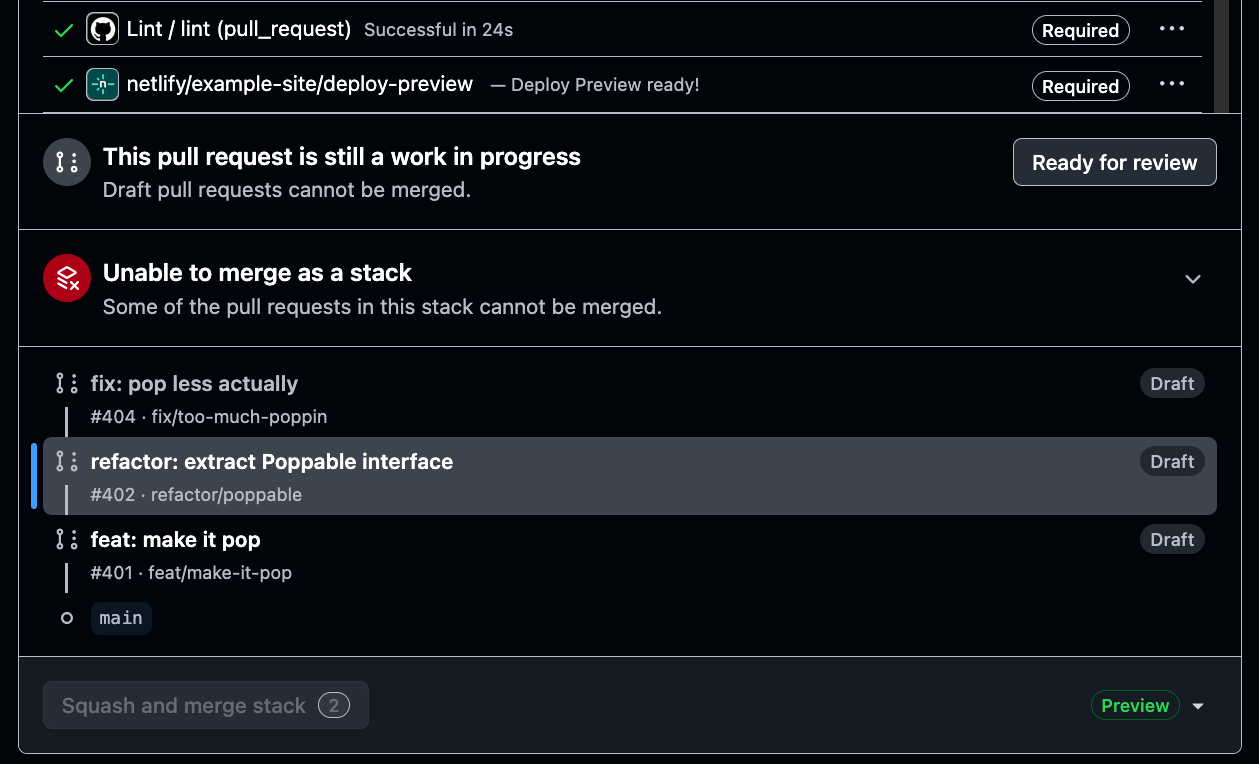
GitHub Stacked Pull Requests help teams split a larger update into smaller, connected pull requests. Each pull request can focus on one step of the work, making changes easier to review and merge in sequence.
Previously, Netlify only created a Deploy Preview for the first pull request in your stack while additional pull requests in the stack didn’t get their own Deploy Previews. Now, every pull request in the stack gets its own Deploy Preview.
There’s nothing new to configure. Create and update your stack in GitHub as usual, and Netlify automatically adds a Deploy Preview to each eligible pull request.
Learn More
-
You can now use AI Gateway in local development with just
npm run devwhen using the Netlify Vite Plugin. Previously, AI Gateway’s auto-configured environment variables only worked when runningnetlify dev, which added friction for developers using Vite-powered frameworks like Astro.With this update, AI Gateway environment variables are automatically populated when running your Vite development server directly. This means you can run standard framework commands without extra steps:
# Works with any Vite-based frameworknpm run devThis is part of our ongoing effort to streamline the developer experience for Vite frameworks. Modern frameworks like Astro let you specify Netlify as your deployment target and handle everything automatically—now AI Gateway works the same way.
This change also improves compatibility with AI coding agents and other automated workflows that expect standard development commands to work without additional configuration.
Learn more about the Netlify Vite Plugin and AI Gateway in the documentation.
-
Today we’re announcing two major updates for Nuxt developers on Netlify:
Day-One Nuxt 4 Support
Nuxt 4 launched today, and Netlify is ready. Deploy your Nuxt 4 apps with zero configuration changes—everything just works. Everything is fully compatible from day one.
Learn more about leveraging platform primitives with Nuxt.
Full Platform Emulation in Your Dev Server with @netlify/nuxt
We’re also launching
@netlify/nuxttoday, a new Nuxt module that brings the entire Netlify platform into your local development environment. Functions, Edge Functions, Blobs, Image CDN, env vars, headers, and redirects all work directly innuxt dev—no separate CLI required.Add the module to your Nuxt 3 or Nuxt 4 app with one command:
npx nuxi module add @netlify/nuxtThis simplifies local development and enables AI coding assistants to build full-stack apps with immediate feedback.
-
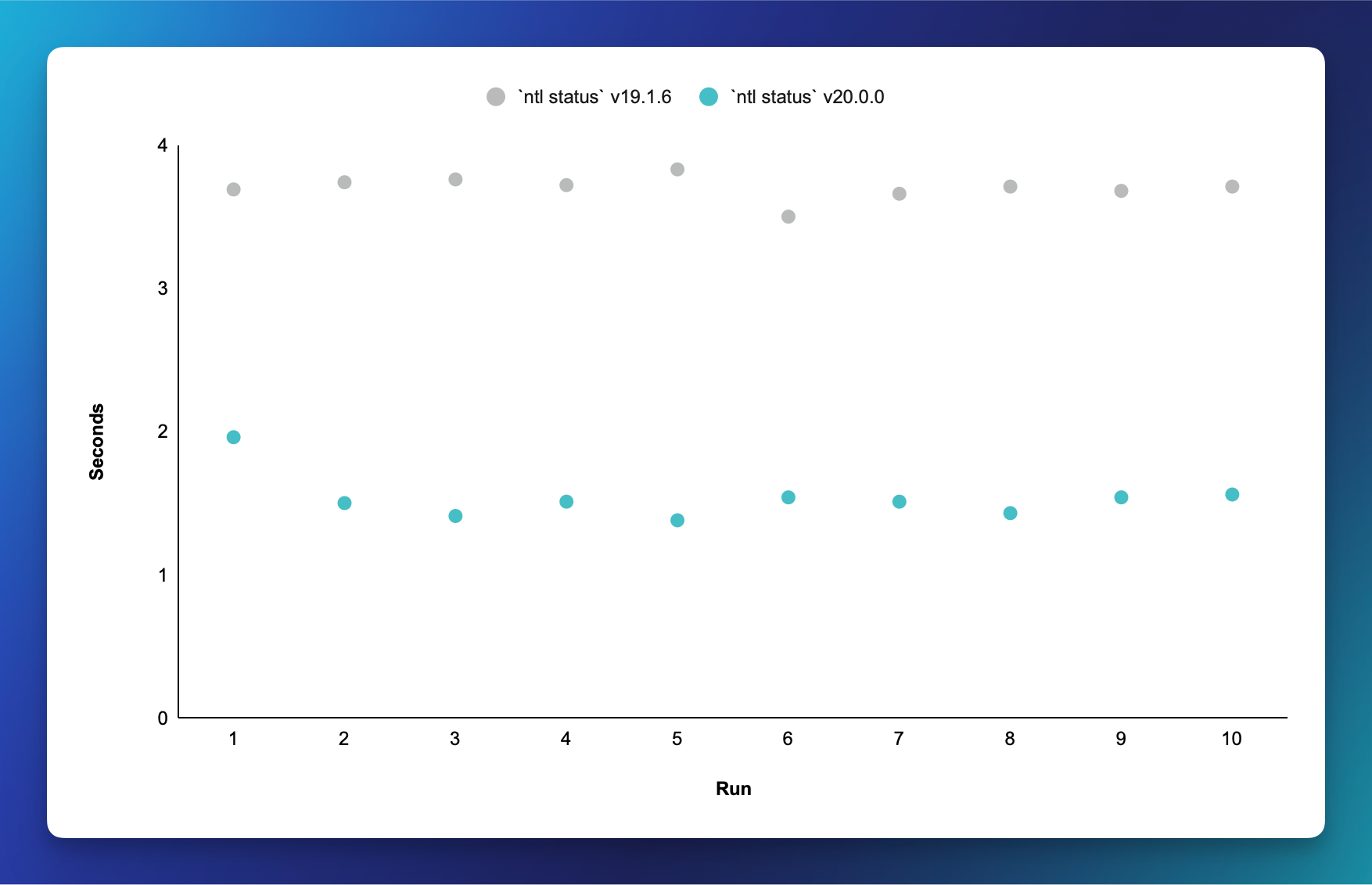
We’ve made meaningful Netlify CLI performance improvements in v20.0.0, making your workflow 2 to 3x faster with:
- ~400ms faster startup for every command
- >2s faster execution for most commands
- ~5s faster builds for Next.js apps
Get the latest by running:
npm install -g netlify-cli@latestFor an additional 10-15% performance boost, use Node.js 22.8.0 or later.