Changelog
-
You can now rename an agent run to more easily identify it in your list of runs and share it with teammates.
Previously, agent runs were automatically titled based on your prompt, which made longer lists harder to scan once you had several runs going.
Editing the title lets you give each agent run a short, meaningful name, such as the feature you’re building or the bug you’re chasing, so you can find it again quickly and send it to a teammate without needing to explain which run is which.
Try it out
Open any agent run, select the title, and type a new name. The updated title appears in your list of runs and anywhere the run is shared.
Learn more about Agent Runners.
-
OpenAI’s GPT Image 2 is now available through AI Gateway. You can call this model from Netlify Functions without configuring API keys; the AI Gateway provides the connection to OpenAI for you.
Example usage in a Function:
import OpenAI from 'openai';const ai = new OpenAI();export default async (req, context) => {const response = await ai.images.generate({model: 'gpt-image-2',prompt: 'Generate a realistic image of a golden retriever working at a tech startup',n: 1,size: '1024x1024',quality: 'low',output_format: 'jpeg',output_compression: 80});const imageBase64 = response.data[0].b64_json;const imageBuffer = Uint8Array.from(atob(imageBase64), (c) => c.charCodeAt(0));return new Response(imageBuffer, {status: 200,headers: {'content-type': 'image/jpeg','cache-control': 'no-store'}});};This model works across any function type and is compatible with other Netlify primitives such as caching and rate limiting, giving you control over request behavior across your site.
See the AI Gateway documentation for details.
-
Agent Runners now include a
frontend-designskill that guides AI agents toward creating distinctive, production-grade frontend interfaces with high design quality.When building web components, pages, or applications, AI agents often default to generic, cookie-cutter aesthetics. The
frontend-designskill steers agents toward creative, polished output that avoids that “AI slop” look and instead produces UIs with real visual identity and craft.Here’s what a generated calculator component looks like without the skill:

And here’s the same prompt with the
frontend-designskill enabled:
The skill is automatically available in Agent Runners and activates when the agent is asked to build web components, pages, or applications. No configuration required—just prompt your agent to build a UI and the skill handles the rest.
Learn more about Agent Runners and available skills in the Netlify docs.
-
Anthropic’s Claude Opus 4.7 model is now available through Netlify’s AI Gateway and Agent Runners with zero configuration required.
Use the Anthropic SDK directly in your Netlify Functions without managing API keys or authentication. The AI Gateway handles everything automatically. Here’s an example using the Claude Opus 4.7 model:
import Anthropic from '@anthropic-ai/sdk';export default async () => {const anthropic = new Anthropic();const response = await anthropic.messages.create({model: 'claude-opus-4-7',max_tokens: 4096,messages: [{role: 'user',content: 'How can AI improve my coding?'}]});return new Response(JSON.stringify(response), {headers: { 'Content-Type': 'application/json' }});};Claude Opus 4.7 is available for all Function types and Agent Runners. You get automatic access to Netlify’s caching, rate limiting, and authentication infrastructure.
Learn more in the AI Gateway documentation and Agent Runners documentation.
-
We’re introducing some pricing updates to our Credit-based plans. Here’s a quick summary of the changes, explained more below.
- Unlimited seats on the Pro plan
- Unlimited form submissions on all Credit plans
- Updated credit rates for bandwidth, compute, and web requests
To understand more on why we’re making these changes, check out our official Netlify blog post on Pricing Netlify for the next 3 billion builders.
Not sure if your plan is impacted? Check out our Impact summary based on plan table.
Read on for concise details and impact timelines.
Unlimited seats on the Pro plan
The Credit Pro plan now includes free unlimited team member seats with a monthly subscription. This means you can invite anyone you like to join your team for the monthly subscription of $20 for 3,000 credits to use across your team’s projects.
Invite or add Owners, Developers, Internal Builders, Publishers, Git Contributors, and Reviewers to your team without extra seat charges. Before you were charged $20 per seat, including for active Git Contributors.
This change applies to Pro plans using credits metered billing only. Legacy Pro plans are not affected. Learn more about how different plans are affected in our impact by plan summary table.
Impact timeline
These seat plan changes apply right away to new upgrades and plans.
For existing teams with a Credit Pro plan, your seat charges will be removed for existing seats at the start of your next billing cycle. In the meantime, you can invite more people to join and collaborate without seat charges starting today.
Unlimited form submissions
Now form submissions are free across all Credit plans. Previously, each form submission cost 1 credit.
Impact timeline
For existing teams with a Credit plan, you’ll notice form submission cost changes take effect starting today.
Updated metered billing
As part of this pricing shift, we’ve also updated how credits are calculated for certain resources. These updates still keep our services competitive.
Meter Previous rate New rate Bandwidth 10 credits per GB 20 credits per GB Compute 5 credits per GB-hour 10 credits per GB-hour Web requests 3 credits per 10,000 requests 2 credits per 10,000 requests Impact timeline
For existing teams with a Credit plan, you’ll notice the metered billing changes take effect starting today.
Impact summary based on plan
Not sure how these pricing updates impact you and your plan?
Check out our impact summary table below for a quick overview.
Plan Type What’s Changing Details Legacy Pro plans No new changes with this update You can continue using your current plan without any changes. To switch to a Credit-based plan, see changing plans. Learn more about Legacy pricing plans. Legacy Free & Starter plans No new changes with this update You can continue using your current plan without any changes. To switch to a Credit-based plan, see changing plans. Learn more about Legacy pricing plans. All Legacy plans No new changes with this update You can continue using your current plan without any changes. To switch to a Credit-based plan, see changing plans. Learn more about Legacy pricing plans. Enterprise Credit plans No new changes with this update Contact your account manager with questions. Learn more about metered billing with credits for Enterprise plans. Pro Credit plans - Unlimited seats on the Pro plan
- Updated credit usage rates for Compute, Bandwidth, and Web requests
- form submissions are now unlimited and freeAdd unlimited team members for a monthly subscription price of $20 for 3,000 credits to use across your team’s projects.
For existing Pro Credit plans, this takes full effect on existing seats at the start of your next billing cycle but you can add more people to your team for free starting today.
Credit rates for Compute, Bandwidth, and Web requests have been updated while keeping services competitive.Free or Personal Credit plans - Updated credit usage rates for Compute, Bandwidth, and Web requests
- form submissions are now unlimited and freeYou still can only have one team member (a Team Owner role) on your plan.
Credit rates for Compute, Bandwidth, and Web requests have been updated while keeping services competitive.All Credit plans - Updated credit usage rates for Compute, Bandwidth, and Web requests
- form submissions are now unlimited and freeCredit rates for Compute, Bandwidth, and Web requests have been updated while keeping services competitive. Learn more
Learn more about Credit-based pricing plans and how credits work.
-
Managing team members just got easier. The Members page now includes sorting and filter controls that help you quickly find and organize your team, available for Pro and above plans.
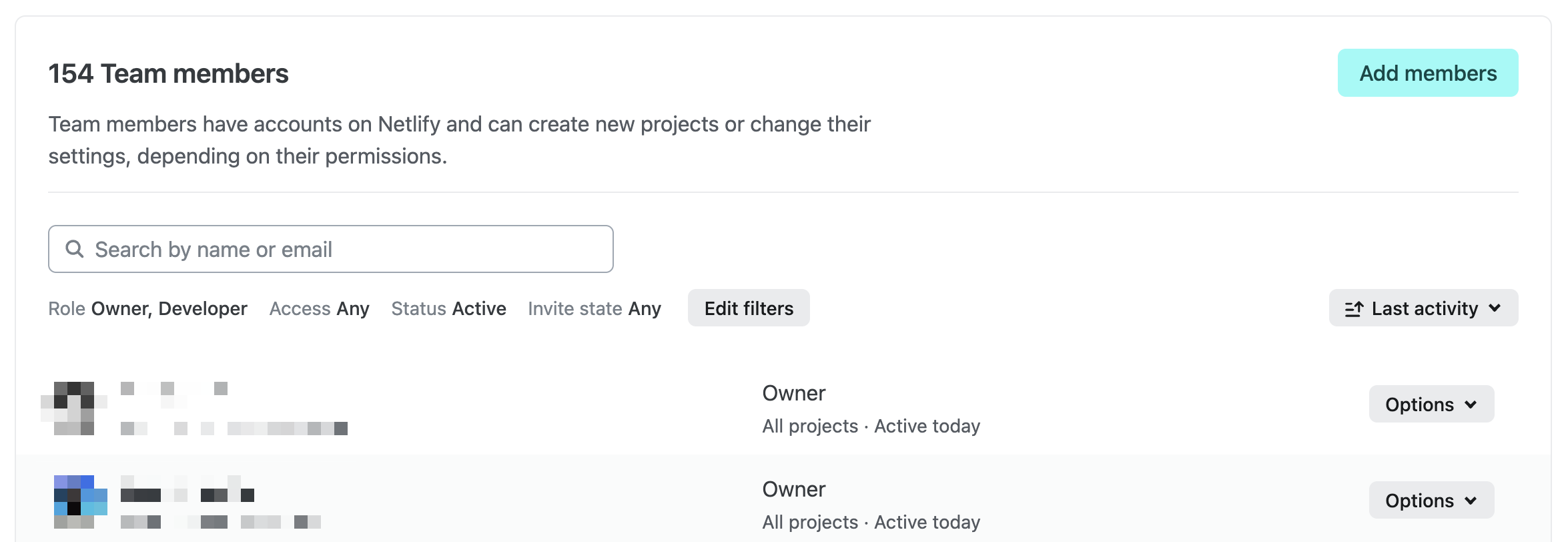
You can now search for team members by name, filter by role, filter by project access, sort by last activity, and more — making it simple to audit access, find specific collaborators, or review who’s been active recently. These controls are especially useful as your team grows and you need more visibility into membership and permissions.
These controls are available now for all teams on Pro plans and above. Head to your team’s Members page to try them out.
-
The GA version of Netlify DB launches the week of April 20, 2026, bringing many significant improvements and it won’t require installing an extension anymore.
The move from the beta experience to the GA database experience is not automatic, and is not required. We will publish detailed instructions for anyone wishing to migrate. There will be no required switch or migration, no loss of data, and no sudden charges for anyone using an already-created database with the beta experience.
Starting today, April 13, 2026, you cannot create new databases using the beta Netlify DB experience. You can still claim existing databases to your own Neon account.
If you created a database in the past week, recall from the Netlify DB beta docs that you must claim your database within 7 days through your own Neon account or the the database will be automatically deleted. Learn more in our docs on claiming your database.
-
A denial-of-service (DoS) vulnerability (CVE-2026-23869, CVSS 7.5) has been disclosed affecting React Server Components (RSCs), a feature used by Next.js and other React metaframeworks. A malicious payload can cause excessive CPU consumption. Here’s what Netlify customers need to know.
Impact on Netlify
Nominally, this is a server-side DoS vulnerability. However, on Netlify this has minimal impact: our autoscaling serverless architecture means that a malicious request resulting in a crashed or hung function does not affect other requests. However, active exploitation could increase your function costs.
Affected frameworks
All RSC frameworks are affected:
- Next.js (see version table below)
- React Router 7 (if using RSC preview)
- Waku
@parcel/rsc@vitejs/plugin-rsc
Astro, Gatsby, and Remix are not affected.
React affected versions
See the React advisory for full details.
Affected versions Fixed in 19.0.0–19.0.4 19.0.5 19.1.0–19.1.5 19.1.6 19.2.0–19.2.4 19.2.5 Next.js affected versions
See the Next.js advisory for full details.
Affected versions Fixed in 13.3.0+ EOL - no fix 14.x EOL - no fix 15.0.0–15.5.14 15.5.15 16.0.0–16.2.2 16.2.3 What should I do?
If any of your projects are using an affected version, we recommend upgrading as soon as possible to a patched release.
For Next.js 13.x and 14.x users: patches are not planned for these versions. Consider upgrading to Next.js 15.x or 16.x.
Note that any publicly available deploy previews and branch deploys may remain vulnerable until they are automatically deleted. Consider deleting these deploys manually.
Resources
-
Watching a deploy? You’ll notice logs now appear faster and more smoothly in the Netlify UI. We’ve reduced log delivery latency and decreased the size of the batches sent to the browser, so output streams in closer to real time.
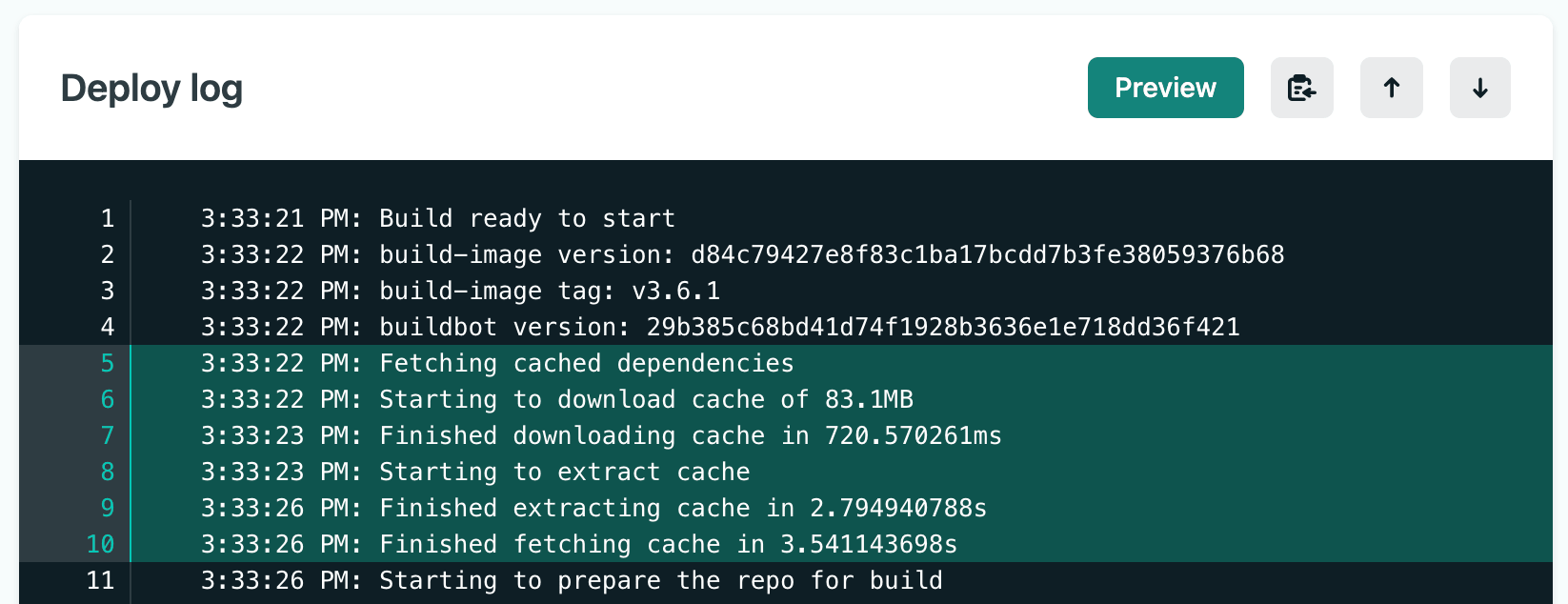
This means less waiting and fewer large chunks of text appearing all at once. Instead, logs flow steadily as your build progresses — making it easier to follow what’s happening and catch issues early.
Deploy logs are available on the detail page of every deploy and show build image details, dependency caching, all standard output from your build, Build Plugin execution, and the final deploy status. For successful deploys, highlights are automatically included in the deploy summary.
You can also share specific log lines with your team — select a line number to highlight it, or shift+click a range to generate a shareable URL. Select the clipboard icon to copy the entire log.
For more details, check out the deploy log documentation.
No changes are required on your end. The improvement applies automatically to all deploy logs viewed on app.netlify.com.